The parent-child account playbook: territory, routing, and expansion without routing wars
A parent-child account model treats one canonical parent and its subsidiaries, locations, and business units as a single family. Get the entities, the ultimate-parent field, dedupe, and rollups right, and territory, routing, and expansion stop being arguments.
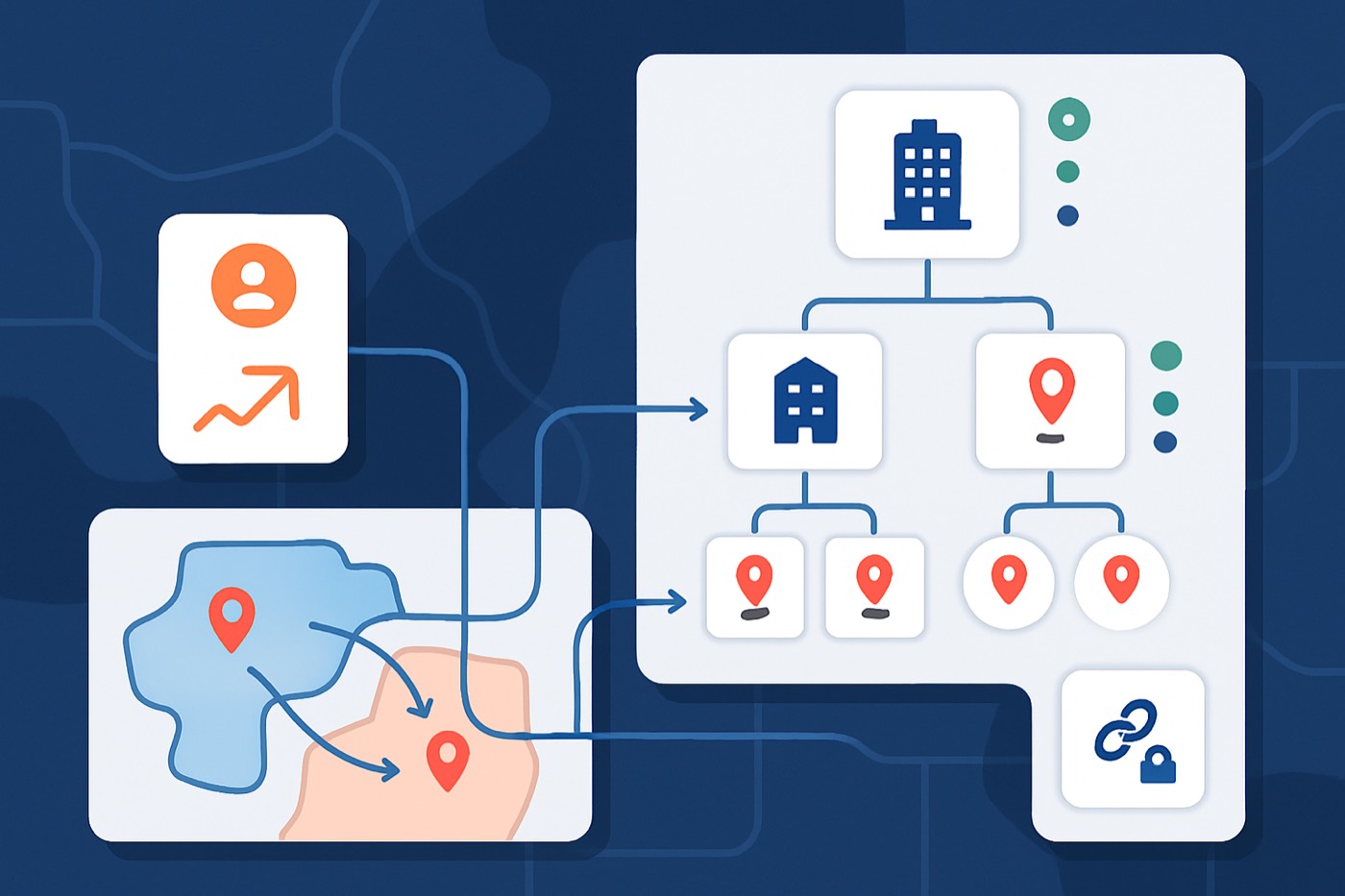
Most routing fights come from one place. Nobody agrees what an “account” is. Get the parent-child account model right and the rest gets boring, fast. Boring is good here. Boring means reps stop stepping on each other, and expansion gets worked on purpose instead of noticed in a Slack thread three weeks late.
This is a guide to the logic, not a CRM admin project. The same model decides how a human team routes accounts and how an autonomous operator like Chronic reasons over an account family before it sends a single email. We will cover the model first, then where the operator fits.
Why hierarchy is the control plane, not cleanup
Most CRMs treat hierarchy like a reporting feature. In practice it is the control plane for everything that touches an account:
- Territory assignment
- Inbound routing
- Outbound personalization
- Account-based expansion
- Accurate rollups for pipeline and revenue
Salesforce models account hierarchy with a single Parent Account field. That is useful, and also a trap once you need more than one view of the same company (legal entity vs location vs business unit). (salesforceben.com)
Buying groups keep getting bigger and harder to align. Gartner found that 74% of B2B buyer teams demonstrate unhealthy conflict during the decision process, and teams that reach genuine consensus are far more likely to feel good about the deal they close. (gartner.com) More stakeholders means more subsidiaries, more regions, and more “who owns this?” arguments. Hierarchy is how you land and expand across that mess without your pipeline turning into a duplicate-riddled guess.
Step 1: define account vs location vs subsidiary
Skip this and you build a hierarchy that looks clean and routes wrong.
The three definitions
1) Account (legal entity)
The contract signs here. Billing happens here. Funding news happens here.
- Examples: “Acme, Inc.”, “Acme Holdings”, “Acme GmbH”
- Signals that belong here: funding, legal name changes, parent acquisitions
2) Location (site)
A physical place. Often relevant for field sales, services, logistics, healthcare, and manufacturing.
- Examples: “Acme Dallas Plant”, “Acme NYC Office”
- Signals: new site opened, headcount at site, local leadership changes
3) Subsidiary (operating company or brand)
A company that operates with its own execs, budget, and stack, even when owned by a parent.
- Examples: “Acme Security (subsidiary)”, “BetaSoft (Acme-owned)”
- Signals: tech installs, product launches, security reviews, hiring spikes
Rule: if two groups can buy separately, they need separate child records, even if procurement rolls up to one place.
Step 2: pick a canonical parent and lock it
You need one record that acts as the anchor for the whole family. Call it what it is.
- Canonical parent (ultimate parent): the top entity you roll up to for territory, reporting, and expansion strategy.
Salesforce admins often add an “Ultimate Parent” field because relying on the chain alone breaks rollups when one link is missing or wrong. (salesforceben.com)
Canonical parent rules
Pick the canonical parent in this order:
- Public parent (if publicly traded, use that top entity)
- Holding company that owns the operating companies
- Entity that controls budget and vendor standardization
- If none apply, pick the highest legal entity you can verify
Store the relationship on every related record:
- Parent Account (direct parent)
- Ultimate Parent (top parent)
- Parent Type (legal, subsidiary, or location)
The Ultimate Parent field is what keeps rollups stable even when someone breaks the middle of the chain.
Step 3: dedupe rules that hold up in the real world
Duplicates do not just inflate your database. They split engagement history, break routing, create double outreach, and make expansion look like churn (or the reverse).
Salesforce ships native duplicate management with matching rules and duplicate rules. Turn it on, then tighten it. (blog.bessereau.eu)
Match on a score, not a single rule
Account match score (0-100):
- Domain match (40 points)
- Exact domain match = 40
- Parent domain match (subsidiary uses parent domain) = 25
- Normalized name match (30 points)
- Strip Inc, LLC, Ltd, punctuation, spacing
- Address match (20 points)
- Street + ZIP for locations
- Phone match (10 points)
Auto-merge threshold: 90+ Manual review queue: 70-89 No match: under 70
Do-not-merge guardrails
Never merge if:
- Different country and you sell on separate legal entities by region
- One record has open opportunities owned by a different segment team
- One record is a location and the other is a legal entity (a common and costly mistake)
Dedupe governance
- One owner: RevOps or Data Ops
- One queue: “Hierarchy Review”
- SLA: review within 48 hours
- Merge log: a required “Merge Reason” field
Step 4: the lightweight data model
You do not need a complicated architecture. You need a model that makes routing deterministic.
Core objects (minimum viable)
Account: one record type used for legal entity, subsidiary, and location, separated by a type field.
Optional, if you want cleaner separation:
- A Site object for locations
- An Account Relationship object for many-to-many cases (partners, franchises, management groups)
Required fields (Account)
Identity
- Account Name (raw)
- Account Name Normalized (text)
- Website Domain (text)
- External ID (text, if you use a data provider)
- Account Type (picklist): Legal Entity, Subsidiary, Location, Brand, Franchise
Hierarchy
- Parent Account (lookup to Account)
- Ultimate Parent Account (lookup to Account)
- Hierarchy Path (text, optional)
- Relationship Confidence (0-100)
- Canonical Parent Lock (checkbox, only ops can change)
Firmographics (child plus rollup)
- Annual Revenue (number)
- Employee Count (number)
- Industry (picklist)
- Region (picklist)
- Billing Country (picklist)
Tech and signals
- Tech Stack (multi-select or linked table)
- Key Systems fields (CRM, ERP, data warehouse, security)
- Last Funding Date (date)
- Funding Stage (text)
- Exec Changes (date plus role)
Routing and ownership
- Territory (lookup)
- Account Owner (user)
- SDR Owner (user)
- Named Account Flag (checkbox)
- Expansion Tier (1-3)
Relationship rules
1) Parent Account is single-parent. A child has exactly one direct parent. That is how most CRMs work anyway.
2) Ultimate Parent is required for every non-top account, even if Parent Account is temporarily blank.
3) Locations belong to a legal entity or operating company. No floating sites.
Step 5: roll-up fields that drive decisions
Rollups are not reporting decoration. They are routing inputs.
Demandbase, for example, supports rolling up engagement from child to parent once the hierarchy exists in Salesforce. That is the pattern: child signals should inform parent strategy. (support.demandbase.com)
What to aggregate, and how
Revenue (roll up)
- Parent Revenue (sum) of children where Account Type is Subsidiary or Legal Entity
- Do not sum locations unless locations report independent revenue
Employee count (roll up)
- Parent Employees = sum of child employees
- If a trusted source already reports headcount at the parent, keep both:
- Employees (source)
- Employees Rolled Up (calculated)
Tech stack (roll up, carefully)
A tech-stack rollup should answer two questions:
- Is this technology present anywhere in the account family?
- Where exactly is it installed?
Model it as:
- Parent Tech Installed (multi-select): the union of child tech
- Tech Install Locations (related list): child account, tech, date first seen, confidence
Intent and engagement (roll up)
- Parent Intent Score = max(child intent), or a weighted max where recent activity wins
- Parent Engagement = sum over the last 30 or 90 days
This matches how account-based segmentation in Salesforce can use hierarchy structures to aggregate audiences. (salesforce.com)
Step 6: territory assignment from the hierarchy
This is where you stop the “but my rep talked to them first” meetings.
The territory principle
Assign territory at the canonical parent, then push it down to children unless a child qualifies for a stated exception.
Default territory logic
- If the Ultimate Parent is a Named Account: route all children to the Named owner team.
- Else if a child has standalone buying authority: assign the child to its local territory.
- Else: inherit territory from the Ultimate Parent.
Exception logic (make it explicit)
A child earns its own owner when it has:
- Separate procurement and separate budget
- Separate tech-stack authority
- A separate region with separate quotas
- An existing-customer subsidiary expanding independently (common in enterprise)
Routing fields you actually need
- Territory Source: Inherited, Exception, or Manual Override
- Override Reason: required when manual
- Override Expiration Date: so temporary overrides do not become permanent by accident
Step 7: outbound that does not break across entities
Hierarchy fails the moment outbound ignores it.
The usual failure: an SDR emails a subsidiary, an AE runs discovery with the parent, activity logs to different records, and personalization degrades into generic, slightly-wrong copy that names the wrong entity. Two reps end up hitting the same buying group from opposite ends.
The rule: outbound attaches to the account family, not one record
That means:
- Personalization references the correct entity (child vs parent)
- Scoring considers both the child’s signals and the parent’s context
- Sequences avoid double-tapping the same buying group across siblings
This is exactly the work an autonomous revenue operator should own. Chronic finds the right contacts, writes and sends the outreach, handles the replies, and books the meetings, while keeping the account family in view the whole time:
- It enriches missing domains, locations, and firmographics before routing fights can even start.
- It scores a child’s signal inside the parent’s context, not in isolation.
- It references the right entity and relationship in the copy, instead of treating each record as a stranger.
- It keeps each conversation anchored to the right parent, with child-level plays running underneath.
- It works the families that match your ICP definition, so “qualified child” is decided up front and surfaced for your approval.
If outbound runs on isolated records, it manufactures duplicates and off-target personalization, and then everyone blames the CRM.
Step 8: expansion triggers that fire at the right level
Expansion is not “they opened an office.” Expansion is “a new budget center appeared” or “standardization is happening.” Mapping the org and timing the push is the whole job, especially when buyer teams already struggle to agree internally. (gartner.com)
Trigger 1: new exec hire at a child
Event: a new CIO, VP Ops, or Head of Security at a subsidiary or location. Play: child-first outreach with parent context.
- Message: “Saw you joined X. Here is a quick view of what the parent is standardizing across the group.”
- Route: child owner, notify parent owner.
- Task: “Map the reporting line and shared systems.”
Trigger 2: new funding at the parent
Event: the parent raises a Series C, opens a debt facility, or signals IPO plans. Play: parent strategy, child execution.
- Message the parent about standardization, procurement, and vendor consolidation.
- Message the child: “The parent just funded growth. Here is how teams like yours roll this out in 90 days.”
Trigger 3: tech install at a subsidiary
Event: a subsidiary installs Snowflake, Okta, Salesforce, NetSuite, or similar. Play: land in the pocket, then expand across siblings.
- Step 1: pursue the installed subsidiary.
- Step 2: map siblings with a similar stack.
- Step 3: multi-thread the parent on standardization.
Trigger 4: intent spike at one child
Event: one child’s engagement spikes on high-intent pages. Play: treat it as an account-family signal.
- Escalate the parent score.
- Launch sibling sequencing where relevant.
- Alert the parent AE that there is a live pocket.
Step 9: the weekly cadence that keeps the tree clean
Hierarchy decays. People create records, vendors rename, subsidiaries spin out. If you do nothing, you end up running a quarterly cleanup that no one enjoys. A light weekly cadence prevents that.
Weekly cadence (60-90 minutes)
Monday: dedupe and hierarchy review (20-30 min)
Queue filters:
- New accounts created in the last 7 days
- Accounts with a blank Ultimate Parent
- Accounts with low Relationship Confidence
- Accounts with an expired manual override
Actions:
- Merge or link
- Lock the canonical parent once confirmed
Wednesday: routing audit (20 min)
Report on:
- Accounts touched by two or more SDRs in 14 days
- Inbound leads routed to different owners under the same parent
- Open opps on a child whose parent is owned by a different segment
Actions:
- Fix territory rules
- Add exception tags where needed
Friday: expansion trigger review (20-40 min)
Report on:
- New exec hires at children
- Funding events at parents
- Tech installs at subsidiaries
- Top 20 parents by intent change week over week
Actions:
- Launch expansion sequences
- Assign account-family mapping tasks
- Update expansion tier
Monthly: a hierarchy health score
Track one number that forces action:
- % of accounts with Ultimate Parent filled
- % of accounts with Account Type filled
- Duplicate rate (new duplicates per week)
- % of child accounts inheriting the correct territory
- Average time to fix a hierarchy issue
Step 10: implementation checklist
- Define Account Types (Legal, Subsidiary, Location) and publish the definitions.
- Add the fields: Ultimate Parent, Relationship Confidence, Territory Source, Override Reason and Expiration.
- Backfill Ultimate Parent for existing accounts (batch job or data loader).
- Turn on duplicate rules using domain plus normalized name.
- Set routing logic: parent-owned by default, with explicit exception criteria.
- Build rollups: revenue, employees, intent, tech union.
- Create the weekly cadence: queues, reports, SLAs.
- Train reps on one rule: “Search the parent. Work the family. Log to the right record.”
Enforce it from day one rather than rolling it out slowly. A model that is half-applied is worse than no model, because people stop trusting it.
Where Chronic fits
The hard part of all this is not the data model. It is keeping outbound consistent with the model once real prospecting starts. That is where an autonomous revenue operator earns its place.
Chronic is not a CRM and not another sequencer you have to babysit. You give it a revenue goal, and it runs the outbound system end to end against the account family you have defined:
- Scoring reflects both child intent and parent fit (AI Lead Scoring)
- Enrichment fills missing domains and entity details before routing fights start (Lead Enrichment)
- Outreach references the right entity and relationship (AI Email Writer)
- Your pipeline stays anchored to the parent, with child-level plays (Sales Pipeline)
- Your ICP rules define what a qualified child looks like up front (ICP Builder)
It sends from managed, warmed mailboxes, handles replies, and books meetings, and it surfaces the decisions that actually need you for approval rather than asking you to run the routing logic by hand.
If you are comparing platforms:
Also worth reading if you are consolidating the stack:
- Outbound stack consolidation in 2026: what to demand from the 1-tool (or 2-tool) setup
- Agent QA is the new RevOps: how to test, monitor, and govern sales agents before they touch your pipeline
FAQ
What is a parent-child account model, in plain English?
It is a structure where one parent company record owns related child records such as subsidiaries, locations, or business units. The point is to keep ownership, routing, reporting, and expansion plays consistent across the whole account family instead of fragmenting them across duplicates.
Should locations be child accounts or a separate object?
If your go-to-market depends on site-level routing (field reps, healthcare facilities, plants), locations deserve their own representation. If your CRM cannot support a separate Site object cleanly, model locations as Account Type = Location, then keep rollups and routing rules explicit so you do not accidentally sum 40 offices into one revenue figure.
What is the single most important field to add?
The Ultimate Parent Account. It keeps rollups stable even when someone breaks the middle of the chain. Salesforce’s standard hierarchy relies on the Parent Account chain, and a broken link breaks downstream reporting and rollups. (salesforceben.com)
How do we stop reps from creating duplicates anyway?
You enforce it rather than ask nicely:
- Duplicate rules based on domain plus normalized name
- A required Account Type field
- A required Ultimate Parent for non-top accounts
- A hierarchy review queue with a 48-hour SLA
Also fix your intake. Most duplicates start at inbound forms and list imports.
How do we handle a subsidiary that buys independently but still rolls up for reporting?
Give it its own child account with a separate owner (under your exception criteria), its own opportunities and activities, and a link to the same Ultimate Parent for reporting and account-family plays. Independence for execution, rollup for strategy.
How does hierarchy improve expansion speed?
Because triggers fire at the right level. A tech install at a subsidiary should not get buried, and a funding event at the parent should not route to a random child owner. Hierarchy turns events into deterministic plays instead of hoping someone notices.
Build the tree, then work the pipeline
Set the definitions. Lock the canonical parent. Enforce dedupe. Roll up the fields that drive decisions. Route by parent, with explicit exceptions. Run the weekly cadence.
Do that and hierarchy stops being cleanup. It becomes the system that ends routing fights and starts expansion loops, whether a human team works it or an autonomous operator runs it for you.