How a right-time outbound engine works: signals, queues, SLAs, and stop rules
Right-time outreach means contacting a prospect when there is a fresh, relevant reason to talk. It is timing plus relevance, run as a system of signals, queues, response SLAs, and stop rules, not as one-off personalization.
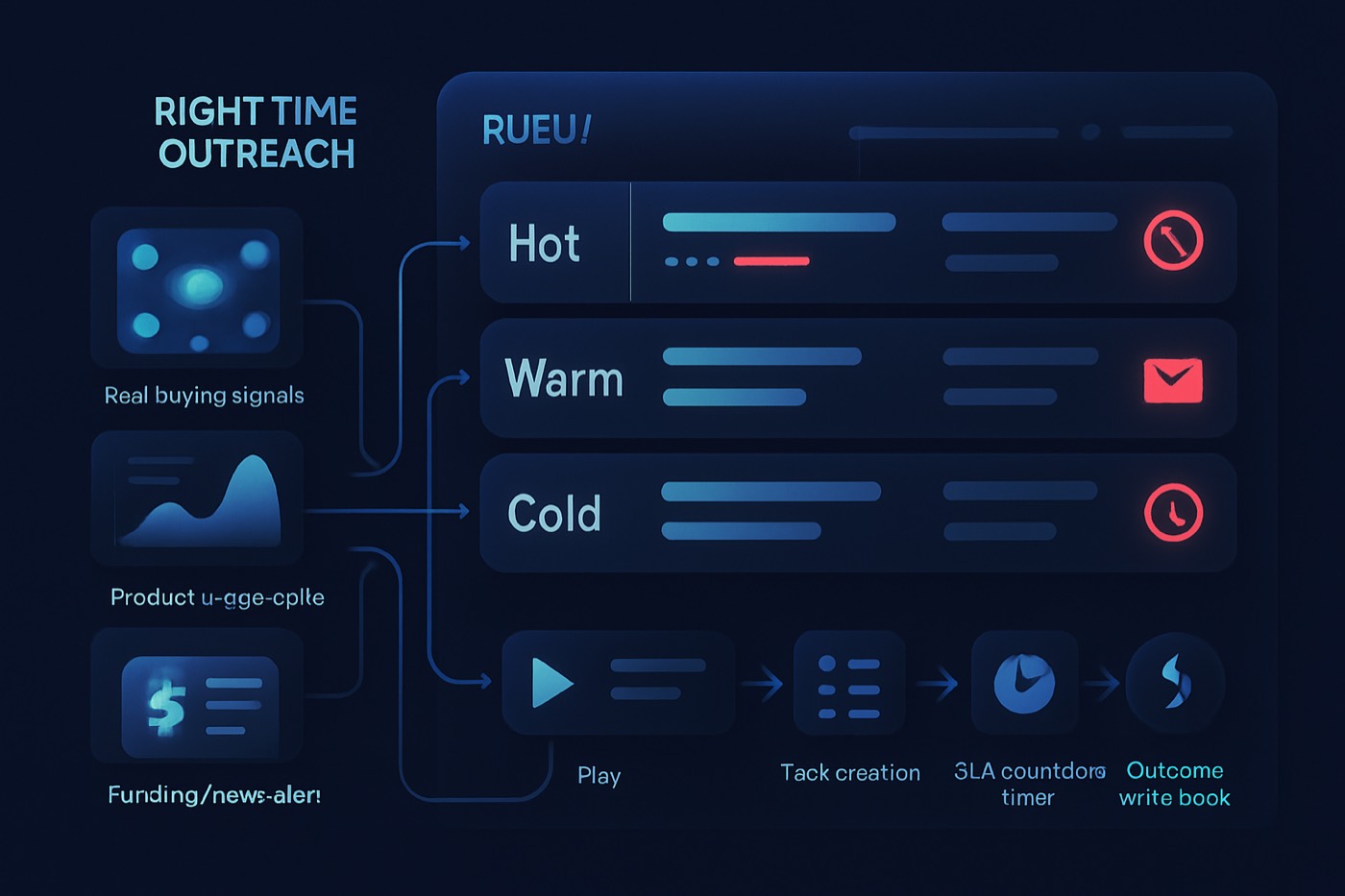
Right-time outreach is the practice of contacting a prospect when there is a fresh, relevant reason to talk and a high probability they are entering a buying window. It is not “personalization.” It is timing plus relevance, run as a system of signals, queues, SLAs, and stop rules.
Most teams try to do this by hand: a rep scans a few intent reports on Monday, sequences whoever looks warm, and forgets the rest. The signals decay, the queue rots, and the timing edge disappears. The alternative is to treat right-time outreach as an operating model that runs continuously, whether a person or an agent is executing it. This guide lays out that model: the data it needs, the math behind prioritization, and the rules that keep it safe.
Chronic is an autonomous revenue operator that runs this loop for you. You set the goal, the offer, and the approval level; the agent watches for signals, prioritizes the work, sends from managed and warmed mailboxes, handles replies, and stops on the rules below, surfacing only the decisions that need a human. You do not have to build any of this in a CRM by hand. But understanding the model is the fastest way to judge whether outbound, automated or not, is actually working.
What a right-time outbound engine is (and what it is not)
A right-time outbound engine is an execution layer that turns messy external and internal signals into:
- Ordered queues (who to contact next),
- Time-bound SLAs (how fast you must act),
- Plays (what to do next),
- Stop rules (when to stop contacting),
- Write-back (a reliable activity and event trail).
It is not a spreadsheet of triggers. It is not “we’ll check intent weekly.” It is a system that makes it easier to do the right thing than the wrong thing, every hour, without anyone remembering to.
Why this matters: response speed and timing are measurable levers. A frequently cited analysis of lead response behavior found that responding within an hour can dramatically increase lead qualification likelihood compared to slower follow-up windows. If you are doing “signal-based outbound” but responding tomorrow, you are paying for signals and then discarding their half-life. (ppai.org)
The data model: what the engine needs to know
Whether a rep or an agent runs the engine, it needs a consistent schema. The unit is a signal: a record of something that happened, for whom, and how confident the system is that it matters.
Minimum signal fields
- Signal Type (enum)
- Funding, Hiring, Technographic Change, Intent Spike, Website Visit, Champion Job Change, Product Launch, Security/Compliance Trigger, Contract Renewal Window
- Signal Source (enum)
- LinkedIn, Crunchbase, BuiltWith, Bombora, G2, website analytics, email engagement, manual
- Signal Timestamp (datetime)
- Signal Confidence (0-100)
- Belief that the signal is real and relevant, not that they will buy
- Signal Strength (0-100)
- Magnitude, like “hired 1 SDR” vs “hiring 12 AE roles”
- Window Score (0-100)
- Estimate that the buying window is open now, derived from recency and type
- Buying Window Expiry (datetime)
- When the signal stops being right-time
- Next Best Action (enum)
- Email step 1, call, LinkedIn connect, send case study, route to AE, nurture, suppress
- Max Response SLA (minutes/hours)
- SLA Due At (datetime)
- Queue Name (derived)
- Example: “Tier 1 - Hiring + Intent - 4h SLA”
- Status (enum)
- Unassigned, In Progress, Waiting, Handed Off, Stopped
- Stop Reason (enum)
- Reply, Bounce, No-fit, Meeting booked, Unsubscribe, Do-not-contact, Duplicate thread
The clean architecture is to log everything as an event and treat “signal” as a subtype. That event model is what Chronic builds on, so the agent can explain why it contacted someone and when. The deeper version is in The 2026 event model behind an autonomous outbound agent (signals, stages, and SLAs).
Step 1: define a signal taxonomy that supports queueing
Most teams fail here by building a taxonomy that is good for reporting but bad for execution. The taxonomy has to answer one question: which queue does this enter, and what SLA does it require?
A practical B2B signal taxonomy
1) Funding
- Definition: New capital event or credible fundraising rumor.
- Why it matters: Often correlates with headcount growth, tool changes, and new initiatives.
- Confidence tips: Use “confirmed” vs “rumor” in Signal Confidence.
- Half-life: Medium (weeks), but strongest in the first 7-14 days.
2) Hiring (role-based)
- Definition: New job posts or headcount growth in specific functions.
- Subtypes: Sales, RevOps, AI/ML, Security, Customer Success.
- Why it matters: Hiring implies workflow stress and budget allocation.
- Half-life: Short-to-medium (days to weeks), depending on velocity.
3) Technographic change
- Definition: Adopted or replaced a tool relevant to your category.
- Why it matters: Tool-change windows are real, but they can also mean you are too late.
- Half-life: Short (days) for “evaluating” signals, longer for “installed” signals.
4) Intent spike (topic or category)
- Definition: Increased research behavior on specific topics.
- Why it matters: Strong predictor of problem awareness, weaker predictor of vendor readiness.
- Half-life: Very short (hours to a few days). This is where SLAs matter most.
5) Website visit (especially pricing, integrations, security pages)
- Definition: Known account or identified visitor hits high-intent pages.
- Why it matters: This is a near-real-time hand raise.
- Half-life: Very short (minutes to hours).
6) Champion job change
- Definition: A known champion moves companies or changes roles.
- Why it matters: Portable trust and reactivated pain.
- Half-life: Medium (weeks), but strongest in the first 30 days.
Implementation rule: do not create 40 signal types. Create 6-10 that map to distinct plays and SLAs. Everything else becomes Signal Strength and Confidence.
To turn signals into a single “buying window” number, you can adapt the framework in 25 B2B buying signals for 2026 (and how to turn them into a buying-window score). This guide stays focused on queueing and SLA mechanics.
Step 2: map each signal to a play and a max-response SLA
This is the heart of the engine. You are building a dispatch system, like incident response or support triage.
Why you need SLAs, even for outbound
Without SLAs, signals are “nice to know” data. With SLAs, signals become work.
A good SLA is:
- short enough to preserve the signal’s value,
- realistic for staffing and time zones,
- measurable in a dashboard,
- enforced automatically.
A sample SLA matrix
| Signal type | Typical trigger | Next best action | Max-response SLA | Window expiry |
|---|---|---|---|---|
| Website visit (pricing, integration) | 2+ high-intent pages in 1 session | Call + email in same thread | 15-60 minutes | 24 hours |
| Intent spike | Account surges on target topics | Email step 1 + LinkedIn view | 4 hours | 72 hours |
| Champion job change | Champion moved to new company | Warm intro email, 1:1 | 24 hours | 30 days |
| Hiring (ICP role) | Hiring RevOps, SDR team, Security | Email with role-specific angle | 24-48 hours | 14 days |
| Funding | Series A-C, growth equity | Multi-threaded outreach to 2-3 personas | 48 hours | 21 days |
| Technographic change | New tool installed that competes or complements | Differentiated switch or extend play | 72 hours | 30 days |
Best practice: define SLAs in minutes or hours, not “same day.” “Same day” dies in execution.
SLA enforcement mechanics
The engine runs three automations on every signal:
- When a signal arrives, set:
- SLA Due At = Signal Timestamp + Max Response SLA
- Window Expiry = Signal Timestamp + Window duration
- If SLA Due At passes and the signal is still unactioned:
- Escalate to an “SLA breach” queue, notify the owner.
- If Window Expiry passes:
- Lower the priority multiplier, or auto-stop the play (depends on signal type).
When Chronic runs the engine, breaches and window expiries are not a person’s problem to remember. The agent re-evaluates the queue continuously and only escalates a missed window to you when it changes what you should do.
Step 3: build prioritization queues from fit score plus a buying-window multiplier
You need two separate numbers:
- Fit score (long-lived): “Should we ever sell to this account?”
- ICP match, firmographics, technographics, persona match.
- In Chronic, this is what lead scoring primarily represents.
- Timing score (short-lived): “Is now a high-value moment to reach out?”
- Window Score, recency decay, signal strength.
The queue formula
Use a composite priority score:
Priority Score = Fit Score x (1 + Buying Window Multiplier)
Where:
- Fit Score is 0-100
- Buying Window Multiplier is 0.0 to 2.0 (or up to 3.0 if you have strong signals)
Example:
- Account A: Fit 92, Multiplier 1.5 -> 92 x 2.5 = 230
- Account B: Fit 55, Multiplier 2.0 -> 55 x 3.0 = 165
This prevents random intent spikes from outranking perfect-fit accounts unless the window is genuinely strong.
How to compute the buying-window multiplier
Start with a base multiplier by Signal Type:
- Website visit: 2.0
- Intent spike: 1.2
- Champion job change: 1.0
- Hiring: 0.8
- Tech change: 0.7
- Funding: 0.6
Apply confidence and strength:
- Confidence factor = Signal Confidence / 100
- Strength factor = Signal Strength / 100
- Apply recency decay:
- 1.0 if < 24h
- 0.7 if 1-3 days
- 0.4 if 4-7 days
- 0.2 if 8-14 days
- 0.1 if > 14 days
Then:
Buying Window Multiplier = Base x Confidence x Strength x Decay
What queues to create
Avoid one mega-queue. Build queues aligned to SLA and channel:
- Hot Window - 1 hour SLA (call-first): website high-intent visits, demo re-engagement
- High Window - 4 hour SLA (email + LinkedIn): intent spikes, competitor comparisons, event attendance
- Moderate Window - 24 hour SLA (email-first): hiring, champion job change
- Planned Plays - 48 to 72 hour SLA (multi-thread): funding, technographic changes
- SLA Breach Queue: anything overdue, sorted by Priority Score
- Do Not Contact Review: edge cases, compliance, data issues
Keep queues honest with enrichment
Queues only work if the data is correct. The engine enriches before it scores:
- Confirm industry, employee count, tech stack, and relevant contacts.
- Fill missing personas so multi-threading is possible.
This is where lead enrichment pays for itself, especially with freshness rules like those in 9 enrichment freshness rules that prevent bad scoring and misrouted leads.
Step 4: implement stop rules (reply, bounce, no-fit, meeting booked, unsubscribe)
Stop rules are not just politeness. They protect deliverability, brand reputation, time, and data quality.
They also keep you aligned with bulk-sender expectations around unsubscribe handling. Yahoo specifically calls out one-click unsubscribe support and honoring requests within two days for bulk senders. (blog.postmaster.yahooinc.com)
The minimum viable stop-rule set
These should be hard stops that automatically remove a contact from all outbound and suppress future tasks.
- Reply received (stop reason Reply). Remove from sequence, create a “reply to handle” task, keep the same thread.
- Hard bounce (stop reason Bounce). Suppress the email channel, trigger enrichment for alternate contact info, stop hammering.
- No-fit (stop reason No-fit). Record the ICP mismatch reason, suppress future outbound unless new evidence appears.
- Meeting booked (stop reason Meeting booked). Stop outbound, convert to an opportunity, route to the owner.
- Unsubscribe (stop reason Unsubscribe). Set Do Not Email, propagate to every sending tool, log the consent event.
Optional but recommended:
- Auto-stop on negative sentiment (LLM-classified)
- Auto-snooze, not stop, on out-of-office
Where teams break stop rules
- They stop sequences but not manual tasks.
- They stop at the contact level but keep emailing the same person from a second inbox.
- They record an unsubscribe in the sending tool but not centrally, so the next campaign re-imports them.
If you run multi-inbox outbound, stop rules have to sync across inboxes and tools. That is exactly the hygiene problem an autonomous operator should own for you, covered in Multi-inbox sending in 2026: how to scale without breaking your data hygiene.
Step 5: write-back hygiene (log every action as an event, one thread per contact)
Right-time outreach fails when the system cannot answer: what happened, what did we do, when, and what was the outcome?
Non-negotiable write-back rules
- Every signal is an event. Store type, source, confidence, and timestamps. If a signal repeats, create a new event, do not overwrite the old one.
- Every outbound action is an event. Email sent, call made, LinkedIn touch, task completed, sequence step executed.
- Every state change is an event. Assigned, escalated, stopped, handed off.
- One thread per contact. If tooling spawns a new thread per step, you lose context and raise spam risk. Replies must map back to the same contact thread ID.
One-thread-per-contact is a deliverability and trust issue, not just organization. Cold-outbound teams increasingly have to treat compliance and opt-out handling as operational requirements, not optional best practices. (blog.postmaster.yahooinc.com)
Event fields worth logging
- Event Type (Signal, Outbound Touch, Outcome, Status Change)
- Event Timestamp
- Actor (human, agent, automation)
- Channel (Email, Phone, LinkedIn)
- Related Signal ID
- Thread ID
- Outcome (replied positive, replied negative, bounced, meeting booked, no response)
This event trail is what lets an agent improve safely over time: it becomes the record the operator reasons over before each next action. The reasoning behind that, and what should stay human, is in What an autonomous outbound agent should run on its own, and what must stay human, in 2026.
A rollout plan in 10 working sessions
If you are standing this up yourself, here is an order of operations. If Chronic runs it for you, this is roughly the same sequence the agent works through during setup, with you approving the definitions rather than building the fields.
Session 1: define ICP and fit-score inputs. Firmographic filters, technographic must-haves or exclusions, target personas, scoring weights. An ICP builder standardizes the criteria so “everyone’s ICP” stops being different.
Session 2: finalize signal taxonomy and field dictionary. Agree on 6-10 Signal Types and write the Confidence and Strength rubrics (what is a 30 vs an 80?).
Session 3: create the SLA matrix and escalation rules. For each signal, set Max Response SLA, Window expiry, and Next Best Action. Define what counts as a breach.
Session 4: build queues. Hot (1h), High (4h), Moderate (24h), Planned Plays (48-72h), and SLA Breach.
Session 5: build the buying-window multiplier. Implement recency decay and multiplier caps, then validate against historical wins and losses.
Session 6: implement stop rules system-wide. Unsubscribe propagation, bounce suppression, reply stops sequence and tasks, meeting booked stops everything outbound.
Session 7: threading and write-back. Decide canonical thread-ID behavior and event format, and confirm every tool writes back.
Session 8: messaging. Use AI-written email to produce signal-referenced first lines and tight relevance, and re-rank queues on a schedule.
Session 9: dashboarding. Track % of signals actioned within SLA, breach volume by queue, reply rate by signal type, meeting rate by signal type, and the distribution of stop reasons (too many bounces means a list-quality problem).
Session 10: QA and anti-garbage rules. Dedupe signals, cap touches per contact per window, and auto-suppress when data is missing (no role, no company, no deliverability check).
Two worked examples
Funding signal
- Signal arrives: Funding, Confidence 80, Strength 70.
- The engine sets Max Response SLA = 48h, Window expiry = 21 days, NBA = multi-thread play (CFO + VP Ops + RevOps).
- Queue: Planned Plays - Funding - 48h SLA.
- Stop rule: if any contact replies, optionally cool down the rest of the company for 48 hours.
- Write-back: log “funding signal created,” then log each touch linked to the signal ID.
Website visit (highest urgency)
- A known account hits Pricing + Integration within 10 minutes.
- The engine sets Max Response SLA = 30 minutes, NBA = call + short email in the same thread.
- Queue: Hot Window - Website - 1h SLA.
- Escalation: if nothing happens in 30 minutes, reassign to a rapid-response owner.
Where Chronic fits
The model above is the operating system; Chronic is the operator that runs it. You give it a revenue goal, an offer, and the level of approval you want, and it executes the loop end to end:
- Fit and timing: lead scoring for stable ICP-fit prioritization, with the buying-window multiplier as the timing overlay.
- Data completeness: lead enrichment so queues are not full of dead or misrouted records.
- Execution: signal-relevant outreach with AI-written email, sent from managed and warmed mailboxes, with reply handling and meeting booking on the same thread.
- Definitions you control: an ICP builder so fit-score drift does not creep in.
The honest trade-off: an operator (human or agent) can run the loop, but it cannot rescue vague signal definitions or missing stop rules. The definitions are yours to set; the disciplined, around-the-clock execution is what you delegate.
FAQ
What is the difference between right-time outreach and intent-based outbound?
Intent-based outbound is usually one signal category (third-party intent). Right-time outreach is the system that combines several signal types, intent, visits, hiring, funding, tech change, champion moves, then enforces queues, SLAs, and stop rules so timing actually changes behavior.
How fast should our SLA be for outbound signals?
Use the signal half-life: website visit 15-60 minutes, intent spike 4 hours, hiring and champion change 24-48 hours, funding and technographic change 48-72 hours. Then measure SLA attainment weekly and adjust to match reality.
How do you stop reps cherry-picking easy work and ignoring the queue?
Make the queue the path of least resistance: generate tasks only from prioritized queues, require a Stop Reason for skipping, track SLA breaches by owner as a KPI, and reassign breached items automatically. When an agent runs the queue, this stops being a discipline problem at all.
What stop rules are essential for compliance and deliverability?
At minimum: unsubscribe, hard bounce, reply, meeting booked, and do-not-contact. Bulk-sender requirements from providers like Yahoo explicitly call for one-click unsubscribe support and honoring unsubscribe requests quickly. (blog.postmaster.yahooinc.com) Even under bulk thresholds, these rules reduce risk.
Should we score at the contact level or the account level?
Both, but keep the concerns separate. Account-level Fit Score and Window Score set queue priority; contact-level readiness sets the Next Best Action (which persona, play, and channel). Score only contacts and you miss multi-threading; score only accounts and you email the wrong person.
What is the simplest way to start with limited bandwidth?
Start with one queue and one SLA. Capture one high-value signal (pricing-page visits or intent spikes), enforce a single 4-hour SLA queue, add stop rules for reply, bounce, and unsubscribe, and log everything as events. Once that works, add hiring and funding. Or let an operator like Chronic run the full loop from day one and approve the definitions as it goes.
Build the minimum viable engine this week
- Define the fields: Signal Type, Signal Confidence, Window Score, Next Best Action, Status, SLA Due At, Stop Reason.
- Pick 3 signals: website visit, intent spike, hiring.
- Set SLAs: 1 hour, 4 hours, 24 hours.
- Create 3 queues for those SLAs, plus an SLA breach queue.
- Implement hard stop rules, and make sure unsubscribe and bounce suppression write back centrally.
- Re-score hourly using Fit Score x (1 + Buying Window Multiplier).
- Review every Friday: SLA attainment, reply rate by signal type, and top stop reasons.