Turning unstructured emails and calls into pipeline updates (without rep busywork)
Most pipeline hygiene problems are capture problems, not discipline problems. Turn emails, calendars, and call transcripts into structured updates with a small extraction schema, field-level confidence scoring, and writeback rules that auto-log safe facts and route risky ones for approval.
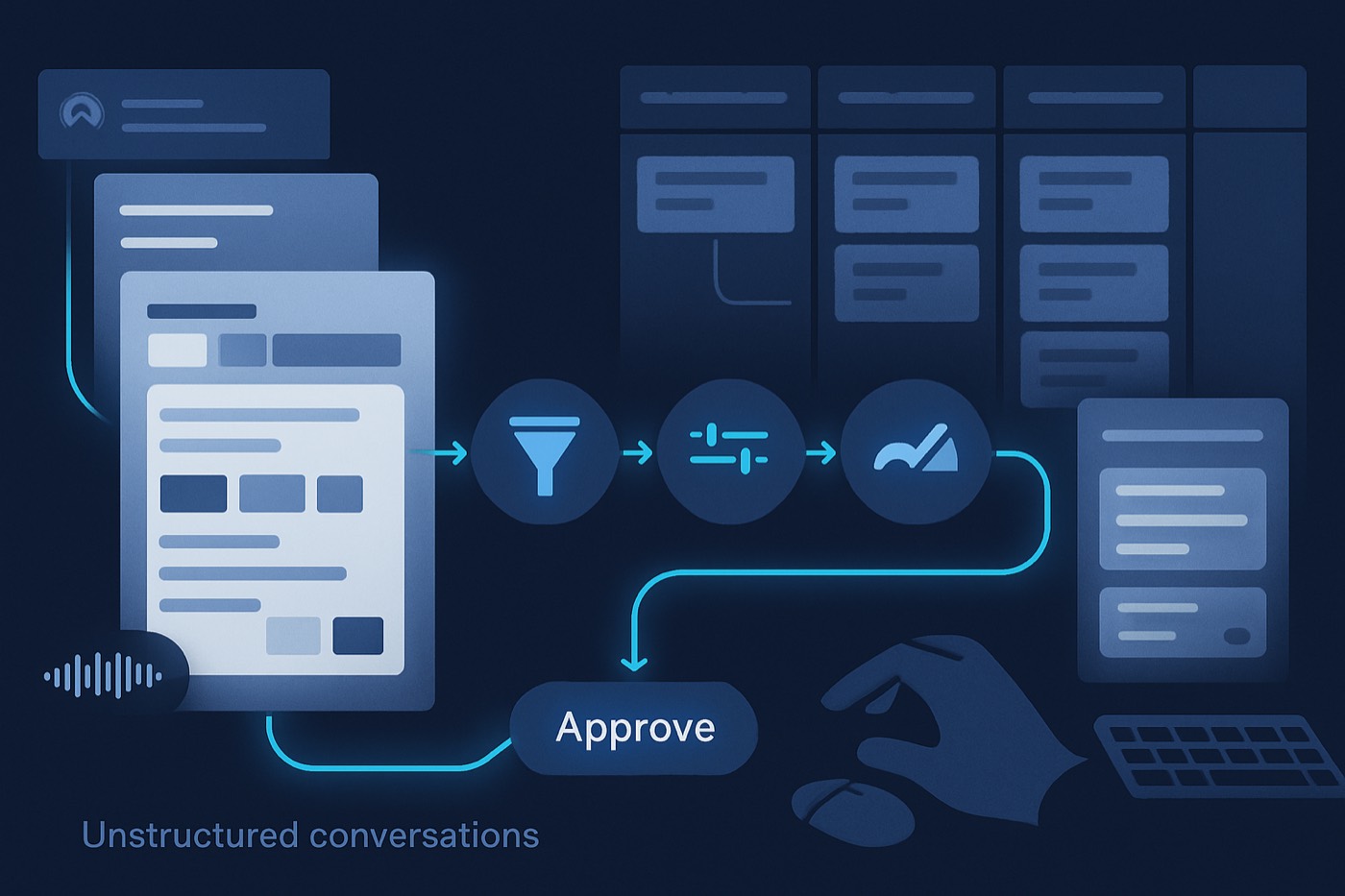
Most pipeline hygiene problems are not discipline problems. They are capture problems. In modern B2B sales, the truth of the deal lives in unstructured conversations: email threads, calendar invites, call recordings, and transcripts. Meanwhile, the pipeline wants neat fields, dropdowns, and stages.
That gap creates rep busywork, forecast fog, and pipeline that looks healthier than it is. Microsoft's analysis of Microsoft 365 activity signals shows employees are interrupted every two minutes by meetings, emails, or notifications, and a large share of meetings are ad hoc. That is the environment your reps are trying to "remember" deal details in. (Microsoft Work Trend Index WorkLab)
The fix is not another field for reps to fill in. It is an operator that reads the conversation, extracts the few facts that move a deal, and writes them back under clear rules, surfacing the risky calls for a human instead of guessing.
What "conversation to pipeline" means (and why it matters now)
Conversation-to-pipeline is the process of capturing information from free-form communications (emails, calls, meetings, notes) and reliably converting it into structured updates: fields, activities, stages, next steps, and risk signals.
Why now:
- Unstructured information dominates enterprise data. IDC has projected the world will generate 175 zettabytes of data by 2025, and widely cited estimates put ~80% of it in unstructured formats. (Forbes Tech Council citing IDC)
- In revenue teams, the cost is operational: if your pipeline does not reflect actual buyer intent, you do not just lose reporting accuracy, you lose deals.
The real enemy is not "manual logging", it is inconsistent interpretation
Two reps can leave the same call and record two different realities:
- Rep A: "Good call, moving to Proposal."
- Rep B: "Stuck on security review, champion unsure."
An operator that captures from the conversation reduces that variance by:
- capturing evidence from the conversation, and
- applying consistent writeback rules instead of each rep's gut read.
The end-state architecture: capture, extract, score, approve, write back
A practical conversation-to-pipeline system has five layers:
- Capture: ingest emails, calendar events, and calls/transcripts.
- Link: match each conversation to the right contact, account, and deal.
- Extract: pull a small set of fields from the conversation (your schema).
- Score: assign confidence per extracted field, not just "overall confidence."
- Write back: update the pipeline with rules:
- Auto-update safe fields.
- Suggest risky fields for human approval.
- Never overwrite key facts without guardrails.
This is the same shape an autonomous revenue operator runs on: do the safe work automatically, escalate the judgment calls. Get these five layers right and you have the foundation an agent needs to act, not just report. (Related: From copilot to sales agent: the 6 capabilities that separate real agentic systems from feature demos)
Step 1: Inventory your conversation sources (start with 3)
This work will fail if you start with 12 sources. Start with the three that already contain most of the deal truth.
Source A: Email (inbound and outbound)
Capture:
- Gmail or Microsoft 365 mailbox
- Sales engagement tool activity (if used)
What email is best at:
- Stakeholders added or forwarded
- Competitive mentions ("We are also evaluating X")
- Pricing pushback and procurement steps
- Written next steps ("Send security docs by Friday")
Minimum metadata to store:
- Direction (inbound/outbound)
- Participants
- Timestamp
- Thread ID
- Deal association (later)
Source B: Calendar (meeting reality, not just invites)
Capture:
- Calendar events and attendee lists
- Meeting titles (useful but noisy)
- Meeting outcome (if available from conferencing tools)
Why calendar matters:
- Calendar is the best early indicator of "deal is alive" versus "deal is wishful."
- Attendee changes are a stakeholder map signal.
Source C: Call recordings and transcripts
Capture:
- Zoom / Google Meet / Teams
- Dialer recordings
- Transcription (plus speaker attribution)
This is where the highest-value fields come from: objections, next steps, timeline, competitor, and mutual plan language.
Operational note: platforms like Gong document that conversation data can sync back to connected systems on defined schedules depending on channel and integration, which matters when you set expectations for "how fast the pipeline updates." (Gong help center)
Step 2: Define a small extraction schema (6 fields that move pipeline)
Do not start by extracting "everything." Start with the few fields that:
- materially change forecast calls,
- affect routing and follow-up, and
- can be verified from the conversation.
Your baseline extraction schema (recommended v1)
- Next step
- Definition: the next buyer or seller action, with a due date when present.
- Examples:
- "Buyer to loop in security by Tuesday."
- "Seller to send MSA and SOC 2."
- Objections
- Definition: stated reasons the buyer might not proceed.
- Examples:
- "Too expensive vs budget."
- "Security requirements."
- "We need feature X."
- Stakeholder
- Definition: any person referenced as influencer, decision maker, blocker, or user.
- Examples:
- "VP of RevOps needs to approve."
- "CIO will join next call."
- Timeline
- Definition: buyer deadline, procurement milestone, or internal target date.
- Examples:
- "Need live by end of Q2."
- "Renewal in April."
- Competitor
- Definition: named vendor(s) in active evaluation or incumbent solution.
- Examples:
- "We are looking at Apollo and HubSpot."
- "Currently on Salesforce."
- Budget
- Definition: any explicit budget range, pricing anchor, or approval limit.
- Examples:
- "We have 30k allocated."
- "Anything over 20k needs CFO signoff."
Add two optional fields if you sell to mid-market or enterprise
- Buying process / stage (security review, legal, procurement)
- Risk signal (champion churn, no next meeting, stakeholder missing)
Step 3: Design confidence scoring that your team will trust
Most teams make one confidence score for the whole summary. That is the wrong approach.
Field-level confidence (what to implement)
Each extracted field gets:
- Confidence score (0.00 to 1.00)
- Evidence pointer: transcript snippet location or email message ID
- Extraction method: rules, model, or hybrid
- Timestamp: when the evidence occurred
Example:
- Competitor: "Apollo" confidence 0.92
- Budget: "$25k" confidence 0.61 (because it was phrased as "maybe around 25?")
A simple confidence rubric (that works in production)
Use three bands:
- High (>= 0.85) Clear, explicit statement.
- Medium (0.65 to 0.84) Implied, partial, or ambiguous statement.
- Low (< 0.65) Guess, weak signal, or model inference.
Why this matters: medium-confidence outputs can still be valuable, but they should show up as "suggested" updates, not automatic writebacks.
Step 4: Set human approval rules (so automation does not break trust)
Pipeline automation fails when it surprises reps or breaks the record of truth.
Gate updates by risk, not by "we trust the agent or we do not." The operator should act on its own where a mistake is cheap and reversible, and ask first where a mistake is expensive.
A practical approval model (v1)
Auto-write (no approval)
- Logging activities (email, meeting, call)
- Creating a note or call summary
- Adding tags like "competitor mentioned" (non-destructive)
- Updating "Last activity date"
- Creating tasks for "Next step" (task creation is lower risk than field overwrite)
Suggest-with-approval
- Next step field (if you store one on the deal)
- Stakeholder additions (especially if it creates contacts)
- Timeline fields (close date adjustments)
- Competitor field on the deal
- Budget range field
Never auto-write (v1)
- Deal stage movement
- Forecast category / commit status
- Amount (unless taken directly from a signed order form, not conversation)
- Contract term, billing terms, or legal status
If you want to automate stage movement later, gate it behind strong evidence:
- a scheduled next meeting,
- a named procurement step,
- and explicit buyer confirmation.
This is also where data discipline matters. Pair this project with a weekly hygiene routine so the operator does not learn from junk fields. (Data hygiene for AI agents: the weekly ops routine that prevents bad scoring, bad routing, and bad outreach)
Step 5: Implement writeback rules (the "do not overwrite" playbook)
Writeback rules are the difference between "helpful" and "harmful."
Rule 1: Never overwrite human-entered values without versioning
If a rep typed a competitor yesterday and the operator extracts a different competitor today, do not overwrite. Instead:
- append as a suggestion,
- or store as "Competitors mentioned (multi)" with timestamps.
Rule 2: Use "append-first" for narrative fields
For notes and summaries:
- append new call summaries to an activity timeline
- link to evidence
- keep older notes intact
Rule 3: Only update close date with a bounded delta
Close date is fragile. Use a guardrail:
- Only auto-suggest changes within +/- 14 days.
- Larger shifts require approval plus evidence.
Rule 4: Avoid auto-creating contacts unless the identity is clear
If an email says "looping in Alex from security," do not create a contact unless:
- you have an email address, or
- Alex appears as a meeting attendee.
Otherwise you will pollute the record with duplicates.
Rule 5: Use a "last confirmed" pattern for critical fields
For Budget, Timeline, and Next Step, store:
- Value
- Last confirmed date
- Confirmed by (buyer, rep, unknown)
- Evidence link
Step 6: A simple Kanban pipeline example (with conversation-based triggers)
Here is a straightforward Kanban pipeline you can run in any pipeline view, including Chronic's Kanban-style board.
Example stages (simple, implementable)
- Inbound / New
- Qualified
- Discovery Scheduled
- Discovery Completed
- Evaluation
- Procurement
- Closed Won
- Closed Lost
What the operator should do in each stage
Discovery Scheduled
- Auto-log calendar meeting and attendees
- Suggest stakeholder role updates (champion, evaluator)
Discovery Completed
- Create call summary activity
- Extract objections + next step + timeline
- Create tasks for next step items
Evaluation
- Extract competitor mentions and evaluation criteria
- Suggest "Risks" if objections appear without mitigation language
- Keep stage unchanged unless approved
Procurement
- Extract legal/security/procurement references
- Suggest timeline changes if buyer deadlines slip
This is also where deal predictions become real, because they are anchored to buyer signals instead of rep vibes.
Step 7: Build the workflow in 7 implementation steps
- Connect sources: email + calendar + call transcripts
- Normalize identities: map participants to contacts/accounts
- Define schema: next step, objections, stakeholders, timeline, competitor, budget
- Extract with evidence: store evidence pointers for every field
- Score confidence per field: high, medium, low bands
- Route approvals: medium and high-risk updates require human signoff
- Write back with guardrails: append-first, no-overwrite, bounded close date shifts
Step 8: Rollout plan for remote teams (no heroics required)
Remote teams need a rollout that is asynchronous, measurable, and respectful of time zones.
Microsoft's Work Trend Index analysis highlights how fragmented work has become for knowledge workers, including frequent interruptions and ad hoc meetings. This makes "extra steps" adoption harder in remote settings, which is exactly why the operator should do the capture rather than ask reps to. (Microsoft WorkLab)
Phase 0 (Week 0): Pick one pipeline and one segment
Choose:
- One sales motion (outbound SMB, inbound mid-market, etc.)
- One pipeline (new business only)
- 5 to 10 reps across time zones
Define success metrics:
- % of deals with next step populated
- stakeholder coverage (at least 2 roles captured)
- time-to-update after meetings
- rep-reported admin time reduction
Phase 1 (Weeks 1-2): Capture and logging only
Deliverables:
- Email and meeting logging is reliable
- Call summaries posted as activities
- No field writebacks yet, just "suggestions"
This is the trust-building period.
Phase 2 (Weeks 3-4): Approvals for 2 fields
Turn on approvals for:
- Next step
- Timeline
Keep everything else as "insights" only.
Phase 3 (Weeks 5-6): Expand to full schema
Add:
- objections
- stakeholder
- competitor
- budget (approval required)
Phase 4 (Weeks 7-8): Optimize and standardize
- Create a QA sampling process (for example, audit 10 deals per rep per month)
- Tune confidence thresholds
- Add "stop rules" that pause automation when data quality drops
If your workflow also triggers outreach, pair it with deliverability-safe infrastructure and controls. (Outreach infrastructure in 2026: secondary domains, one-click unsubscribe, and complaint thresholds (what to implement first))
Step 9: Operational guardrails (so it scales past the pilot)
Governance checklist
- Data retention: where transcripts live, how long, who can access
- PII policy: what you store in notes
- Role-based access: managers vs reps vs ops
- Auditability: every writeback has evidence, timestamp, and actor (system or human)
QA sampling playbook (simple)
Every week:
- Sample 20 approved suggestions
- Mark: correct, partially correct, incorrect
- Track false positives by field type
- Retrain prompts, rules, or extraction patterns
Cost control
Conversation processing can become usage-based quickly (transcription minutes, enrichment credits, model tokens). Put forecasting in place early. (Consumption pricing for AI sales tools in 2026: how to forecast costs and prevent surprise bills)
Where an autonomous operator fits the workflow (practically)
This workflow becomes far more valuable when the system of record is also a system of action. An autonomous revenue operator runs the same capture-score-approve loop across the whole motion, not just inside one deal:
- Signal scoring: conversation-derived intent can raise or lower priority (example: "active evaluation" language).
- Enrichment: when a stakeholder appears in an email or meeting, the operator can fill firmographics and role context. (Related: Lead enrichment in 2026: the 3-tier enrichment stack (pre-sequence, pre-assign, pre-call))
- Reply handling and follow-ups: extracted objections and competitor context shape better recap emails and next touches.
- Slippage prediction: extracted next steps and risks flag stalling deals earlier.
- Meeting booking: verified conversation outcomes can trigger the next step instead of waiting for a rep to remember.
The rule stays the same end to end: the operator does the safe work on its own and surfaces the judgment calls. It only proposes stage moves, amount changes, or new outreach once the writeback rules and approvals above are mature.
FAQ
What is the biggest mistake teams make when capturing conversation data into the pipeline?
They try to auto-update too many fields too early. Start with capture plus suggestions, then roll out writebacks field-by-field with approvals and clear "never overwrite" rules.
Which pipeline fields are safest to auto-update from emails and calls?
Activity logs (emails, meetings, calls), last activity date, and appended notes/summaries are safest. Task creation for next steps is also usually safe. Stage changes, forecast category, amount, and close date shifts should be suggested first and approved.
How do you prevent this automation from creating duplicate contacts?
Only auto-create contacts when identity is deterministic, such as an email address in the thread or an attendee object from a calendar event. Otherwise, queue a suggested stakeholder for rep approval.
Do we need perfect transcription accuracy for this to work?
No. You need evidence links and confidence scoring. If the system can reliably extract a handful of fields at high confidence and route the rest for approval, you still remove most rep busywork while keeping the pipeline accurate.
How do we measure success in the first 60 days?
Track leading indicators:
- % of active deals with a verified next step
- median time from meeting end to pipeline update
- stakeholder coverage per deal
- rep time spent on admin (self-report plus activity volume)
- manager forecast edits per week (should decline as pipeline becomes more accurate)
Launch the pilot: your 10-item implementation checklist
- Pick one pipeline and 5 to 10 reps.
- Connect email, calendar, and call transcripts.
- Define your v1 schema (6 fields).
- Implement evidence pointers for every extraction.
- Implement field-level confidence scoring.
- Turn on suggestion-only mode for 2 weeks.
- Add approvals for next step and timeline first.
- Define writeback rules (append-first, no-overwrite, bounded close date changes).
- Run weekly QA sampling and threshold tuning.
- Expand by stage, then by team, then by region.