Previewable ICP matching: validate lookalike accounts before you spend credits
Validate a small preview sample of lookalike accounts and write a quick QA rubric before you scale. Turn that rubric into scoring rules, then enrich and email only the accounts that pass, so you stop wasting credits on bad-fit prospects.
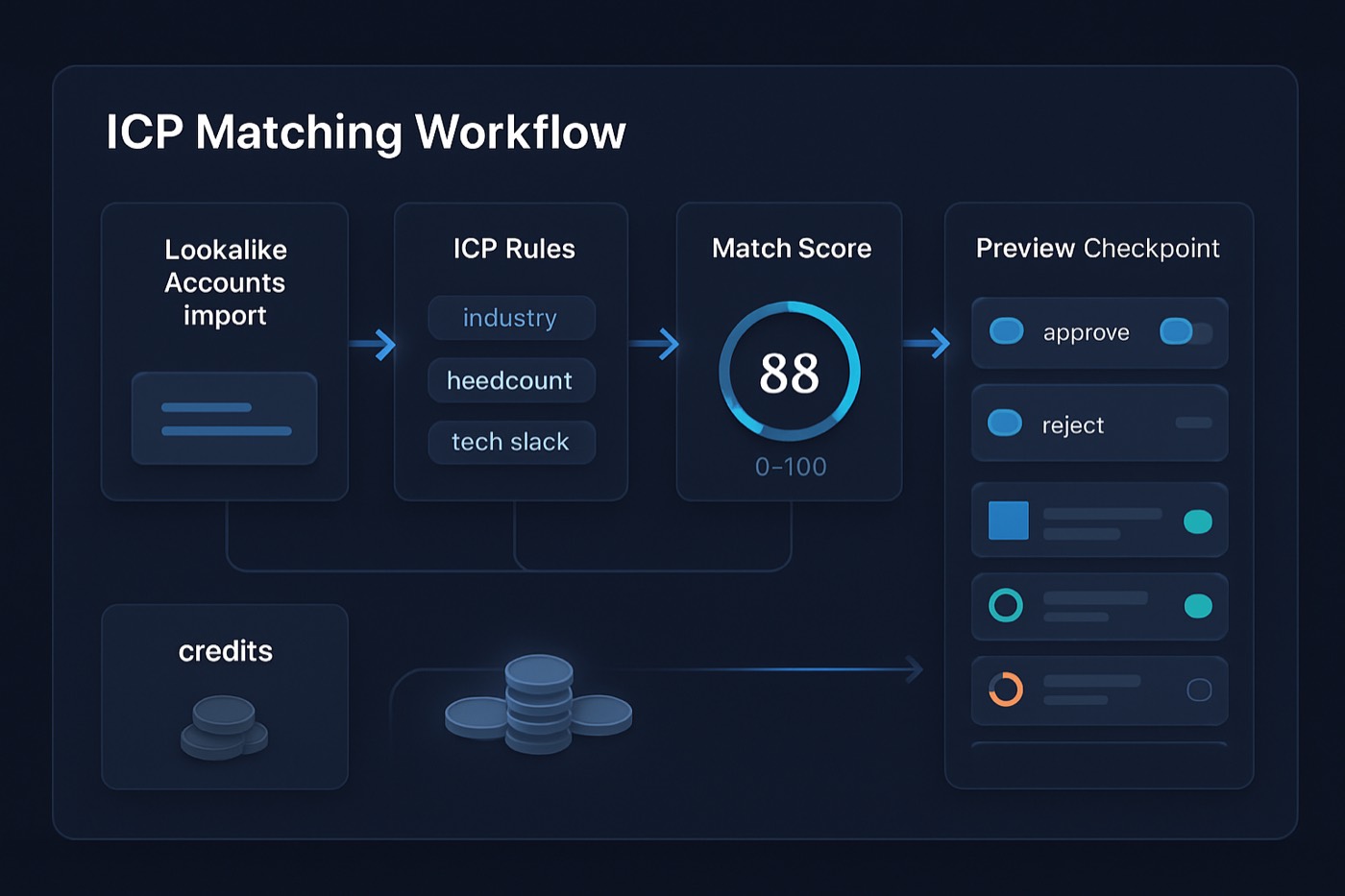
Most B2B teams burn money on "lookalikes" for one reason: they scale before they can see what the model thinks their ICP is. Previewable ICP matching fixes that with a simple checkpoint. You validate a small, representative sample, then encode what "good" looks like before you expand to your full TAM.
This is the targeting logic that should sit underneath any outbound effort, and especially underneath an autonomous operator that finds, scores, and emails accounts for you. Before it spends on enrichment or sends a single email, it should show you a preview of who it picked and why, so you can correct course early instead of after a bad campaign.
This guide turns the Clay + Ocean.io "preview-based lookalikes" story into a repeatable ICP matching workflow: define inspectable fit, preview a sample, QA it fast, convert the rubric into scoring rules, and only then scale outreach to your full TAM. It is the same loop Chronic runs as an autonomous revenue operator, so think of it as how the agent decides who to target before it ever hits send.
What "previewable ICP matching" means (and why it matters)
Previewable ICP matching is a process where you:
- generate lookalike accounts from a seed list,
- review a small preview sample first,
- and only then scale enrichment and outreach once you confirm the matches are truly aligned.
Clay described a "preview-based lookalike experience" with Ocean.io that shows a representative sample before major credit spend, specifically to avoid "surface-level matches" and give you a chance to revise before you purchase or enrich at scale. That transparency is the real innovation, not the math. Source: Clay's announcement post on the Clay + Ocean integration (published March 6, 2026). Clay blog: Clay + Ocean integration
If your team has ever said "the list looked right in filters, but replies were garbage," preview-first is the fix.
The practical problem preview solves: data quality and targeting drift
Even when your ICP is clear in your head, your data sources are not perfectly consistent, and your "lookalike" model might over-weight the wrong signals. Industry research regularly flags data quality and audience targeting as top GTM challenges. For example:
- Ascend2 and Anteriad research coverage reported that improving data quality is a top priority, and that reaching the right audience is a major challenge. MarTech coverage
- Gartner's widely cited estimate puts the cost of poor data quality at about $12.9M per year on average. BRC write-up referencing Gartner
Preview-first reduces wasted spend because you catch mismatches before you enrich thousands of rows or email people who were never going to buy.
The core ICP matching workflow (preview-first, then scale)
Below is the repeatable ICP matching workflow, using the Clay + Ocean.io preview story as the mental model. It is also the targeting loop Chronic runs as an autonomous operator: pick a representative sample, show its reasoning, get a human read, then expand only what passes.
Step 0: Start with a clean seed set (your "truth list")
Your lookalike results are only as good as the examples you feed in.
Seed list best practices
- Use 20 to 100 accounts that are proven wins (closed-won, renewal expansion, short sales cycle, high retention).
- Exclude:
- "logos we wanted" but never converted
- partner referrals that do not match your normal motion
- one-off edge cases that required custom work
Pro tip: Split your seed into "Core ICP" and "Adjacent ICP." Run lookalikes separately. You will learn faster.
Step 1: Define ICP features that are inspectable (not vibes)
The fastest way to make preview QA easy is to define ICP in a way that is observable in data. It is also what lets an agent explain its choices instead of asking you to take them on faith.
Here's a practical definition:
Inspectable ICP features are attributes you can verify from reliable signals without guessing. They usually fall into four categories: firmographics, technographics, hiring signals, and triggers.
1) Firmographics (stable context)
These are usually the foundation. Keep them simple and falsifiable:
- Employee range (example: 50 to 500)
- Geography (example: US, Canada, UK, Australia)
- Industry (example: B2B SaaS, agencies, IT services)
- Business model (B2B vs B2C)
- Sales motion (PLG, sales-led, enterprise)
What to avoid: overly broad NAICS, vague "tech company," or any field you cannot consistently verify.
2) Technographics (stack fit)
Technographics help you align with "stack pain." Examples:
- CRM in use (HubSpot, Salesforce)
- Data and outbound tools (Apollo, Clay, Instantly)
- Analytics or CDP (Segment)
- Cloud (AWS, GCP, Azure)
This is where Lead Enrichment becomes a core part of the workflow, but only after preview QA validates which tech signals actually matter.
3) Hiring signals (budget + urgency proxy)
Hiring is a directional signal, not a guarantee, but it is inspectable. Examples:
- hiring for "Sales Ops," "RevOps," "SDR Manager," "Demand Gen"
- headcount growth in sales or marketing
- new office or region expansion
4) Triggers (why now)
Triggers turn "good fit" into "good timing." Examples:
- new VP Sales or Head of Growth
- raised a round
- product launch
- entering new market
Important trade-off: triggers can bias your list toward venture-backed or high-visibility companies. That is why regional and segment bias checks belong in Step 3.
Step 2: Generate a preview sample (before you spend real credits)
This step is the "preview-based lookalikes" insight. Clay's Ocean.io integration explicitly highlights showing a representative sample of lookalike results before heavy spend so you can judge whether it is "on target or completely off." Reference: Clay blog: preview-based lookalike experience
What "preview sample" should look like
Aim for:
- 50 to 200 accounts in the preview batch
- A mix across:
- industries
- sizes
- regions
- known competitors
- known "bad fits" (to test false positives)
How to structure preview in practice
If you are using Clay + Ocean.io:
- Use Ocean.io lookalike discovery inside Clay, and keep the run intentionally small at first. Clay's own guidance encourages running on a small sample to verify results before scaling. Clay University lesson
- You can also review Ocean.io's lookalike search positioning directly. Ocean.io lookalike search page
If an autonomous operator like Chronic is running this for you, the preview becomes a built-in approval step rather than a manual export. The agent assembles a preview batch, tags each account with the seed set, model version, and the reason it matched, and puts that sample in front of you before it enriches every field or starts outreach. You are approving a sample and its reasoning, not babysitting a spreadsheet. The point is inspection, not completion, so the operator holds off on full enrichment until the sample passes.
Step 3: Run a fast human QA rubric (false positives, missing segments, regional bias)
This is the step most teams skip, and it is exactly where preview-first wins. When an agent is doing the targeting, this is also the moment you keep your hands on the wheel.
The 3 failure modes to detect in preview
- False positives Companies that match superficial traits but will never buy.
- Missing segments Your best segments do not show up (model blind spot).
- Regional or visibility bias Too many US-only, too many venture-backed, too many "loud on the internet."
Template: 10-point Preview QA Checklist (copy/paste)
Use this checklist in a shared doc and require a pass before scaling.
- Industry fit: Does the company's primary product or service match our ICP target category?
- Business model fit: Are they B2B in the way we sell (not consumer, not marketplace if that is excluded)?
- Size fit: Do they fall in our employee and revenue bands (or the closest proxy you trust)?
- Buyer presence: Is there evidence of a function we sell to (Sales, RevOps, Growth, Agency owner, etc.)?
- Tech fit: Do they use or likely use tools we integrate with or displace (if tech stack is part of ICP)?
- Sales motion fit: Does their GTM motion resemble customers who succeed with us (PLG vs enterprise, inbound vs outbound)?
- Budget signal: Any evidence they can pay (pricing tier fit, headcount growth, recent funding, or enterprise indicators)?
- Timing signal: Any triggers that suggest active change (hiring, new leadership, expansion)?
- Exclusion check: Are our known "never fits" showing up (students, agencies if excluded, gov if excluded, very small SMB if excluded)?
- Bias check: Is the preview overly concentrated by region, language, funding type, or a single vertical?
Scoring recommendation: 0 to 2 per item. Total score out of 20.
- 16 to 20: likely ICP match
- 12 to 15: borderline, requires segment tag
- < 12: exclude
Make QA fast (15 minutes, not a workshop)
For each preview account, require only:
- homepage skim
- LinkedIn company page skim
- 1 technographic datapoint if available
- 1 hiring or trigger datapoint if relevant
If it takes longer, your ICP features are not inspectable enough. Simplify Step 1.
Step 4: Convert the rubric into scoring rules (so the workflow scales)
Once humans can reliably label preview accounts as "yes, maybe, no," your next job is to encode that logic as a scoring model. This is the handoff point: human judgment becomes rules the operator can apply consistently to thousands of accounts.
This is where Chronic does the heavy lifting:
- AI Lead Scoring converts your QA signals into consistent, explainable rules.
- Lead Enrichment fills in the missing firmographics and technographics those rules need.
- ICP Builder stores the definition and produces matches in a structured way the agent can act on.
A simple rule framework that works in real teams
Use a weighted model with hard gates:
Hard gates (auto-exclude)
- Outside supported regions
- Under minimum size
- Excluded industries
- Non-B2B model (if required)
Weighted factors (add points)
- Uses target tech (example: +3 if HubSpot or Salesforce present)
- Hiring for RevOps or SDR leader roles (+2)
- Recent funding (+2)
- Strong website positioning match (+2)
- Competitor replacement signal (+2)
Penalties
- Services-only agency (if not target) (-4)
- Job board / directory / media site (-5)
- Too small / too early (-3)
Keep it explainable
Your scoring model must answer: "Why is this an ICP match?"
That is not just a nice-to-have. It is what lets you trust an agent to act on the score, and it is what prevents list arguments when a rep questions an account.
If you want a deeper scoring philosophy, pair this workflow with a proof-based approach that requires evidence fields the operator can show on demand. (Related reading: Proof-Based Lead Scoring)
Step 5: Scale to full TAM only after the score is stable
Once your preview QA is consistent and your scoring rules are live, then you let the system scale.
Scaling pattern (recommended)
- Expand from preview (50 to 200) to Pilot TAM (1,000 to 5,000 accounts)
- Monitor:
- distribution of scores
- bounce rates and deliverability indicators
- reply quality by segment
- Only then expand to full TAM
This is also where the operator does what it is built for. Once scoring is stable, Chronic runs discovery and enrichment against the pilot TAM, sends from warmed, managed mailboxes, handles replies, and books meetings, while surfacing approvals for the decisions that matter. You stay focused on fit and reply quality; the agent handles the mechanics. (See: Sales Pipeline to track which segments convert.)
Why "scale last" saves budget
Most enrichment and data providers charge by row, by field, or by export. Preview-first ensures you do not pay to enrich, or worse, email, thousands of accounts that your team would reject in 30 seconds with a website skim. It also protects deliverability: sending into a half-validated list is how domains get burned.
Step 6: Keep a record of why each account was chosen (provenance)
The difference between "a list" and "a system you can trust" is provenance.
Provenance means every matched account carries:
- what seed set generated it
- which model version
- which scoring rules
- which data sources
- when it was validated
- who approved it
This is exactly how you prevent the classic GTM failure: someone changes ICP quietly, the agent or the SDRs keep working the old definition, and nobody can explain the performance swing. It is also the difference between an operator you can delegate to and a black box. When you can ask "why did we target these accounts?" and get a factual answer, handing over the decision stops feeling like losing control of it.
Minimum fields to keep per account (recommended schema)
Whether you track this in your CRM, a sheet, or let Chronic keep it as the operator's record, capture at least:
ICP Fit Score(0 to 100)ICP Segment(Core, Adjacent, Exclude, Test)Match Reason Codes(multi-select: TechFit, Hiring, Trigger, FirmographicFit)Lookalike Source(Ocean, internal model, partner, manual)Seed List IDModel VersionScoring VersionValidated In Preview(true/false)Validated ByandValidated DateEvidence Links(homepage, job post, tech source)
Then outreach only goes to accounts with:
Validated In Preview = truefor initial waves, and- a score above your threshold.
If you are planning an outbound stack refresh, align this with your system-of-record vs system-of-action design. (Related: Outbound Stack Blueprint for 2026)
A practical "Clay + Ocean.io preview" workflow you can run as an operator
Clay's integration narrative is essentially:
- Use Ocean.io to find lookalikes.
- Preview results before spending heavily.
- Iterate until the lookalikes reflect nuance. Reference: Clay + Ocean blog post
Chronic runs the durable version of that loop. Preview QA and provenance are how the agent decides who to target, and the approval step is native rather than a spreadsheet ritual you maintain by hand.
Example: 2-week rollout plan (lean team)
Day 1 to 2: ICP inspectable features
- Create first ICP definition
- Document exclusions and "never fits"
- Choose 2 to 3 segments max
Day 3: Preview batch
- Generate 100 lookalikes
- Assign QA reviewers (SDR lead + AE + RevOps), or review the agent's preview yourself
Day 4: QA + decision
- Score each preview account with the checklist
- Identify the top 3 false positive patterns
- Identify missing segments
Day 5 to 7: Scoring rules
- Encode hard gates and weights
- Run a backtest against known wins and losses
- Lock scoring version v1
Week 2: Pilot TAM + outreach
- Expand to 1,000 accounts
- Enrich only required fields
- Record provenance on every match
- Let the operator launch controlled outreach behind approval gates
To keep messaging safe while you scale automation, keep approval gates on AI-written emails. (Related: Human-in-the-Loop AI SDR approval patterns and Autonomous SDR email templates with approval gates)
Template: ICP Change Log format (keeps GTM aligned)
Use this format every time you change ICP definitions, scoring, or exclusions. Store it in a shared doc and keep the key fields with every matched account so changes are traceable.
ICP Change Log (copy/paste)
Change ID: ICP-YYYY-MM-DD-01 Date: (YYYY-MM-DD) Owner: (Name, team) Approved by: (RevOps lead, Sales lead, Marketing lead)
What changed (one sentence): Example: "Expanded Core ICP to include B2B agencies with 20-100 employees using HubSpot."
Reason for change:
- Data observed (preview QA findings, win-loss analysis)
- Business context (new product tier, new region)
Definition changes:
- Firmographics: (old -> new)
- Technographics: (old -> new)
- Hiring signals: (old -> new)
- Triggers: (old -> new)
Exclusions updated: Example: "Exclude staffing firms, exclude consumer apps."
Scoring changes:
- Scoring version: v1 -> v2
- Hard gates updated: (list)
- Weight updates: (list)
Impact assessment (expected):
- TAM size change: + / - estimate
- Regions affected: (list)
- Known risks: (bias, deliverability, rep workload)
Validation evidence:
- Preview batch ID(s)
- QA pass rate
- False positive patterns addressed
Rollback plan:
- What metric triggers rollback
- Who executes rollback
Common pitfalls (and how to avoid them)
Pitfall 1: Your ICP features are not inspectable
If QA reviewers keep saying "I can't tell," you are defining ICP in terms of intent and maturity you cannot verify.
Fix: Reduce to signals you can observe in 60 seconds, then iterate.
Pitfall 2: You confuse "lookalike" with "good timing"
Lookalikes solve "fit." They do not automatically solve "why now."
Fix: Treat triggers as a separate layer of scoring, not the core match definition.
Pitfall 3: You skip provenance and cannot explain results
When leadership asks "why did we target these accounts?" you need a factual answer.
Fix: Always record the seed list, model version, scoring version, and evidence behind each match.
Pitfall 4: Overfitting to what is easy to find
Preview sets often over-index toward well-documented companies.
Fix: Add a bias check. If your best customers are low-visibility, require at least one segment built from alternative signals (partners, directories, review sites, hiring data).
Why an operator beats a list you maintain by hand
A CRM can store these fields, but it will not enforce preview QA, scoring governance, or provenance on its own. Someone has to run the loop every cycle: build the seed set, preview, QA, score, scale, and keep the record straight. That work usually slips and the list drifts.
An autonomous operator runs the loop continuously and keeps the reasoning attached. Where Chronic fits:
- Scoring and prioritization with explainability, so you can see why each account ranks: AI Lead Scoring
- Structured ICP definition and matching the agent acts on: ICP Builder
- Enrichment for the exact fields your scoring needs, not every field on offer: Lead Enrichment
- Pipeline visibility to see which ICP segments actually convert: Sales Pipeline
If you are weighing how this fits alongside the tools you already run, these comparisons may help frame the trade-offs:
- Chronic vs HubSpot: HubSpot comparison
- Chronic vs Salesforce: Salesforce comparison
- Chronic vs Apollo: Apollo comparison
- Chronic vs Pipedrive: Pipedrive comparison
- Chronic vs Attio: Attio comparison
- Chronic vs Close: Close comparison
- Chronic vs Zoho CRM: Zoho CRM comparison
FAQ
How big should my preview sample be for an ICP matching workflow?
Start with 50 to 200 accounts. It is large enough to reveal false positive patterns and segment gaps, but small enough for fast human review in under a day.
What is the single most important output of preview QA?
A short list of "reason codes" that explain why an account is a match or not. Those reason codes become your scoring rules and the provenance the operator attaches to every account.
How do I detect regional bias in preview-based lookalikes?
Look at the distribution of HQ country, primary language, and hiring region. If your preview is 80% US but your customer base is not, your lookalike model is likely over-weighting signals that are more visible for US companies.
Should I rely more on technographics or firmographics for ICP matching?
Use firmographics for hard gates and technographics for differentiation. Firmographics prevent obvious waste (wrong size, wrong region). Technographics help you find "stack pain" and prioritize the best-fit accounts inside the right firmographic bands.
How do I keep Sales and Marketing aligned when we change ICP scoring?
Use an ICP change log with versioning, approvals, and a rollback plan. Then keep the scoring version and ICP version with every matched account so you can audit performance by definition change.
What should I record so the targeting is auditable?
At minimum: ICP score, segment tag, match reason codes, seed list ID, model version, scoring version, validation status, validation date, and evidence links. Without these, you cannot explain why a list changed or why results shifted, and you cannot safely let an agent run on the score.
Launch the preview-first ICP matching workflow this week
- Pick 30 closed-won accounts and define 8 to 12 inspectable ICP features.
- Generate a 100-account preview lookalike batch and run the 10-point QA checklist.
- Convert your QA outcomes into hard gates, weights, and reason codes.
- Scale to a 1,000-account pilot TAM only after scoring is stable.
- Record provenance on every match, then let the operator run outreach behind approval gates so you can step back without losing the thread.