How to model a PLG data schema: users and workspaces, PQL scoring, and routing
Model PLG around five objects (Account, Workspace, User, Subscription, Product Event), score PQLs at the workspace level with weighted events, recency decay, and role weighting, then route on score plus ICP fit and buyer coverage.
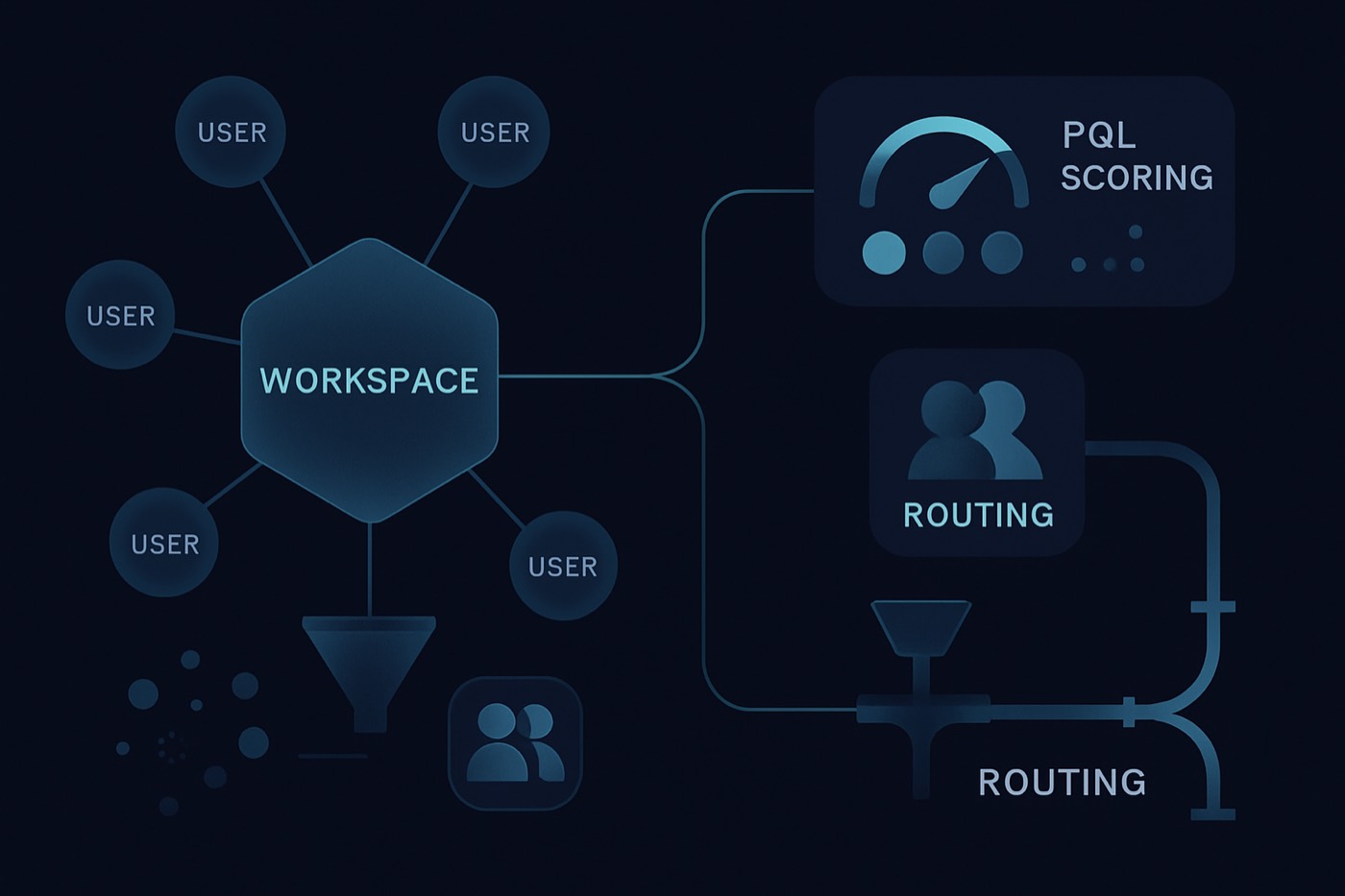
If you run a product-led motion in B2B SaaS, your data model has to capture how PLG actually happens: people sign up, create or join a workspace, collaborate, hit usage limits, and then someone with authority upgrades. Get the schema right and every downstream system, including the agent or rep that follows up, can act on real product intent instead of guessing.
Attio's work on modeling Users and Workspaces makes the core point explicit: the buyer is often a workspace, not a single lead, and the strongest signals live in user-level events grouped into a workspace-level story. Attio's standard Users object represents a user of your product and relates to a Workspace, and those relationships are first-class. (Users standard object, Manage standard objects)
This guide is tool-agnostic. The same schema works whether you store it in a warehouse, a CRM, or feed it to an autonomous revenue operator like Chronic that scores workspaces and runs the outreach for you.
Why users-and-workspaces modeling is the foundation, not a nice-to-have
In a classic outbound model, a simple hierarchy is enough:
- Lead -> Contact -> Account -> Opportunity
In PLG and hybrid sales, that hierarchy breaks because:
- The first person to sign up is rarely the buyer.
- Purchase decisions happen at a workspace level (team adoption, integrations, seats, usage limits).
- Your highest-intent signals are in-product events, not form fills.
A users-and-workspaces model fixes this by capturing:
- Who is using the product (Users),
- Where they use it (Workspaces),
- How deeply they use it (Product Events),
- Whether it is monetized (Subscription),
- Who the commercial owner is (Account / Company).
Attio's docs frame Workspaces as accounts using your product and connect them to Users in a many-to-many relationship. (Manage standard objects, Users standard object)
Define the 5 core objects (a PLG-first data model)
You want a model that supports:
- PQL scoring
- Routing and handoffs
- Expansion and churn-risk signals
- Multi-workspace, multi-domain, and multi-user complexity
Here is the recommended object set.
1) Account (Company)
Represents a commercial entity you can sell to.
When it exists
- Sometimes only after enrichment (you may not know the company on day 1).
- Sometimes inferred from billing domain, SSO, or invoice details.
Key fields (sales-relevant)
account_id(internal)primary_domainall_known_domains(array)employee_count,employee_rangeindustry,sub_industryhq_country,hq_regiontech_stack(high-level technographics)icp_fit_tier(A/B/C),icp_fit_score(0-100)current_owner(AE/CSM)lifecycle_stage(Prospect, PQL, SQL, Customer, Expansion, Churn Risk)
How Chronic uses it
- Chronic enriches and resolves company details from email domain, website, or billing fields, so the Account record stays clean and ICP fit is scored before any outreach goes out.
2) Workspace
Represents the in-product tenant: org, team, instance, or project space.
This is your PLG account for product signals. It is where you should:
- compute the PQL score,
- define activation,
- roll up usage and seat signals.
Key fields (product + sales)
- Identity
workspace_id(required, immutable)workspace_namecreated_atworkspace_status(active, deleted, trial ended)
- Ownership and association
account_id(nullable, mapped when resolved)workspace_primary_domain(from invited users, SSO, billing)billing_contact_email(if present)
- Activation and usage depth
activation_dateactivation_milestone(enum: created first project, installed integration, invited teammate, etc.)time_to_value_minutesortime_to_activation_hoursweekly_active_users(WAU)core_feature_adoption_count(number of key features used in last 14/30 days)usage_limit_hits_30d(count)
- Seats and expansion
seat_count_totalseat_count_active_7dseat_growth_30dinvites_sent_14d
- Integrations
integrations_installed(multi-select)integration_installs_30dcrm_connected(bool)
- Commercial
plan_tier(free, trial, pro, enterprise)trial_end_datepaid_status(free, trial, paid)mrr,arr(if paid)
- Sales readiness outputs
pql_score(0-100)pql_stage(Not PQL, Warm, PQL, Hot PQL)routing_destination(SDR, lifecycle email, in-app, CSM)next_best_action
3) User
Represents an end user of your product.
Attio's Users standard object (for a SaaS product's users, not Attio login users) includes a primary_email_address, user_id, and a relationship to workspace. (Users standard object)
Key fields
- Identity
user_id(internal)primary_emailperson_id(CRM person/contact record reference)
- Role and buying signals
product_role(admin, member, viewer)job_title,seniority(enriched)department(enriched)is_workspace_admin(product truth)
- Engagement
last_active_atsessions_7d,sessions_14dcore_actions_7d(count)
- Routing helpers
persona(builder, champion, evaluator, economic buyer)buying_role_weight(numeric multiplier used in scoring)
4) Subscription
Represents monetization state.
Why separate it from Workspace
- A workspace can have multiple subscriptions over time.
- In enterprise, billing may be consolidated across multiple workspaces.
Key fields
subscription_idworkspace_idaccount_id(optional, if billing is centralized)status(trialing, active, past_due, canceled)plan,billing_periodmrr,arrseats_purchased,seats_usedrenewal_datetrial_start,trial_end
5) Product Event
Represents atomic product telemetry.
Do not try to store every raw event in your CRM. Instead:
- store a curated event stream (high-signal events only), or
- store aggregates in Workspace/User plus keep raw events in your warehouse.
Recommended event fields
event_idevent_nametimestampworkspace_iduser_idevent_properties(JSON)source(web, backend, mobile)is_key_event(bool)event_weight(optional, if you precompute)
Object linking: the minimum relationship graph that prevents PLG chaos
You want to answer these questions instantly:
- Which users belong to which workspace?
- Which workspace maps to which account?
- Which person/contact record corresponds to which product user?
- What is the subscription status for the workspace?
The canonical relationship map
- Workspace 1-to-many Users
- Workspace 1-to-many Product Events
- Workspace 1-to-many Subscriptions
- Account 1-to-many Workspaces (often many-to-many in reality, but start 1-to-many and support exceptions)
- User 1-to-1 Person/Contact (when resolved)
- Account 1-to-many People/Contacts
Identity resolution rules (do this before you score)
Most PQL systems fail because the same human exists as:
- anonymous device,
- signup email,
- later SSO user,
- later billing admin.
If you use Snowplow or a similar pipeline, implement identity stitching so multiple identifiers resolve to one user journey. Snowplow's docs define identity stitching as combining various user identifiers into a single user identifier for a complete picture of journeys. (Snowplow identity stitching)
Practical identity resolution checklist
- User keys
- Require
user_idat signup (internal UUID). - Capture
primary_emailonly when the user provides it.
- Require
- Workspace keys
- Require
workspace_idas the stable tenant identifier.
- Require
- Contact mapping
- Map
User.primary_email->Contact.email(with dedupe). - Maintain
user_idon the Contact record for reversibility.
- Map
- Domain mapping
- Do not map workspaces to accounts by domain alone without guardrails (see failure modes below).
The fields that matter most for sales: a PLG signal dictionary
Sales does not need every event. It needs a stable set of interpretable signals.
Activation (time-to-value) fields
activation_milestone_completed(boolean + timestamp)time_to_activation_hours(numeric)activation_path(enum: invited teammate, integration, created project, published, etc.)
Why: activation is the earliest leading indicator for conversion in PLG programs.
Usage depth fields
wauandmaucore_feature_days_used_14dkey_feature_adoption_ratio= (key features used) / (key features available)automation_runs_7dor equivalent value-delivered counter
Why: frequency plus depth separates casual testers from teams building muscle memory.
Seats and collaboration fields
invites_sent_7d,invites_accepted_7dactive_seats_7dseat_growth_30d
Why: collaboration is one of the strongest signals that a tool is becoming a team standard.
Integrations installed fields
integration_installed_countintegration_installs_30dcrm_integration_installed(boolean)data_warehouse_export_enabled(boolean)
Why: integrations indicate switching costs and operational adoption.
Monetization and intent fields
trial_days_remainingupgrade_clicks_7dpricing_page_views_7dusage_limit_hits_30dapi_rate_limit_hits_7d(for dev tools)
Why: friction events (limits, upgrade clicks) are purchase-timing signals.
Step-by-step: build your PLG schema (users + workspaces) in 10 steps
1) Write a one-sentence definition for each object
Example:
- Workspace: "A tenant in our product where multiple users collaborate and where monetization occurs."
This prevents workspace-versus-account arguments later.
2) Define your activation milestone (one primary, two secondary)
Activation must be measurable and tied to real value.
Example for a collaboration SaaS:
- Primary: "Workspace has 2+ active users and completed Key Action X."
- Secondary: "Integration installed."
- Secondary: "Usage limit hit."
PLG frameworks consistently treat activation, the moment users experience core product value, as the critical early milestone. (ProductLed PLG framework)
3) Create a key-event taxonomy (10 to 25 events max)
Create categories:
- Activation events
- Depth events
- Expansion events
- Intent events
- Negative events (churn risk)
4) Instrument events with required identifiers
Every key event must include:
workspace_iduser_id(or an anonymous id that stitches later)timestamp
No identifier, no score.
5) Build Workspace rollups in your warehouse (recommended) or in your CRM
Examples of daily rollups:
workspace_wau_7dworkspace_invites_14dworkspace_key_feature_days_14dworkspace_integrations_installed
6) Enrich users and map to accounts
Enrich:
- job title, seniority, department
- company name, size, industry
Then map workspace -> account using a multi-signal rule:
- billing domain match OR SSO domain match OR majority user domain match (with a minimum user count)
7) Add a PQL scoring table that is explainable
A score sales cannot understand gets ignored.
Include:
score_totalscore_components(activation, depth, expansion, intent, fit)top_reasons(human-readable strings)
8) Set thresholds and routing rules
Example:
- Score >= 80 and ICP Fit A/B and admin present -> SDR
- Score 60-79 -> lifecycle email + in-app prompts
- Score < 60 -> nurture only
- Paid customer and score >= 70 -> CSM expansion play
9) Create workspace-ownership logic
If you do not define ownership, everyone assumes someone else owns it.
Rules:
- Unassigned PQL workspaces go to the SDR pool.
- Assigned accounts follow AE ownership.
- Expansion signals go to CSM/AE based on segment.
10) Validate weekly with closed-won feedback
Every week:
- compare scores to outcomes (demo booked, opp created, closed-won)
- adjust weights, decay, and thresholds
Treat scoring as a living model with drift and recalibration cycles. For the governance pattern, see Lead scoring drift: the CRO playbook.
A PQL scoring recipe you can implement immediately
A PQL is widely defined as a lead that has experienced meaningful value from the product, typically in trial or freemium, and shows behavior indicating readiness to buy. (TechTarget PQL definition)
Your scoring model should be:
- behavior-based (product events),
- adjusted by persona and role,
- time-aware (recency decay),
- guarded against spam.
Scoring structure (0 to 100)
Use five buckets:
- Activation (0-25)
- Usage depth (0-25)
- Expansion signals (0-20)
- Intent signals (0-20)
- ICP fit overlay (0-10)
Event weights (example)
Activation
workspace_created+2key_action_completed+15first_value_delivered+8
Usage depth
core_feature_used+2 each day (cap at +10 per 7d)automation_run+3 (cap at +12 per 7d)
Expansion
invite_sent+2 (cap at +10 per 14d)invite_accepted+4 (cap at +12 per 14d)new_active_user_day+2 (cap at +10 per 14d)
Intent
pricing_page_view+3 (cap at +6 per 7d)upgrade_click+8usage_limit_hit+10trial_days_remaining <= 3+5
Negative
workspace_downgraded-15uninstall_integration-60_active_days_last_14-20
Recency decay (simple and effective)
Decayed points = points * exp(-days_since_event / half_life_days)
Recommended half-life values:
- Intent events: 7 days
- Activation events: 30 days
- Usage depth events: 14 days
- Expansion events: 21 days
This stops a single early spike from keeping a workspace marked hot forever.
Role-based weighting (because not all users are equal)
Multiply event points by a role factor based on product role and enriched job function:
- Workspace admin: 1.3x
- Manager/Director/VP: 1.2x
- IC in target function: 1.0x
- Student, personal email, unknown: 0.6x
Then compute:
workspace_score= max(admin_user_score, champion_score) + team_adoption_rollups
This avoids the classic trap: a power user in a non-buyer role inflating the score.
Thresholds that route cleanly
Start with three stages:
- Warm (50-64): nurture + an in-app "invite teammates" prompt
- PQL (65-79): lifecycle email + SDR light touch if ICP fit is strong
- Hot PQL (80+): SDR immediate, AE assist for enterprise segments
Routing logic: SDR vs lifecycle email vs in-app (with examples)
Routing should be deterministic enough to trust, but flexible enough to handle edge cases.
Route to SDR when:
pql_score >= 80, ANDicp_fit_tier in (A, B), AND- at least one of:
- admin present,
- pricing/upgrade intent,
- seat growth > threshold.
SDR task payload should include
- top 3 score reasons
- last 5 key events
- list of admins and champions
- suggested email opener (based on events)
How Chronic handles this: Chronic scores the workspace from these product signals, prioritizes the ones worth a human touch, and writes the first email referencing the exact milestones that triggered the score (integration installed, limit hit, seats added). It sends from managed, warmed mailboxes, handles the replies, and books the meeting, surfacing an approval before anything reaches a prospect when the decision matters.
Route to lifecycle email when:
- the score is mid-range, OR
- ICP fit is uncertain, OR
- there is no buyer-role coverage yet (no admin, no manager).
Lifecycle email goal
- drive one missing milestone:
- invite teammate,
- install integration,
- complete activation step.
If you run outbound sequences, enforce safe sending and suppression rules. See Send limits and suppression rules for safe outbound in 2026.
Route to in-app when:
- the user is active now and the next best action is product-driven. Examples:
- "Connect Slack to turn on alerts"
- "Invite 2 teammates to start shared workflows"
- "Try feature X to reduce time-to-value"
In-app is often faster than email for the finish-setup moment.
Common failure modes (and how to design around them)
Failure mode 1: event spam inflates scores
Symptoms:
- Scores spike from repeated low-value events.
- SDRs chase hot workspaces that never convert.
Fixes:
- Cap points per event per time window.
- Prefer distinct days used over raw counts.
- Add negative scoring for obvious loops (the same action repeated 100 times in an hour).
- Use anomaly detection (see the automation section below).
Failure mode 2: missing identity resolution breaks the story
Symptoms:
- One person appears as multiple users.
- Workspaces show no admin even though one exists.
- Usage events cannot be mapped to contact records.
Fixes:
- Implement stitching and a stable
user_idstrategy. - Enforce
workspace_idon every key event. - Use a single contact-mapping table between your CRM and product users. Snowplow highlights identity stitching as combining identifiers into one user identifier to better track journeys. (Snowplow identity stitching)
Failure mode 3: duplicative workspaces fragment adoption
Symptoms:
- The same company has multiple workspaces from pilots, regions, or sandboxes.
- Seat counts look small per workspace, but real adoption is large.
Fixes:
- Add
workspace_type(prod, sandbox, dev). - Find merge candidates based on:
- same SSO domain,
- same billing entity,
- high overlap of users.
- Score at both levels:
- workspace PQL score,
- account-aggregated PLG score.
What an autonomous revenue operator does with this schema
Rule-based scoring gets you to good. Automation that reasons over the schema gets you to reliable at scale, and to action without a queue building up. This is where an autonomous revenue operator earns its place: it reads the model you just built and runs the next step.
What to expect it to do (concretely)
Anomaly detection
- Flag a workspace whose event rate is 5x its 30-day baseline.
- Catch bot-like patterns: 100 signups from the same IP block in the same minute, so they never become a false hot PQL.
Score explanation
- Every score comes with top reasons, what changed since yesterday, and what to do next, so a human can sanity-check a decision before approving it.
Deal-likelihood reasoning
- Combine product rollups (activation, depth, seats, intent), ICP fit, and prior outcomes to rank which workspaces are worth a human touch now versus a nudge.
Outreach that runs itself
- Assign the workspace, write the first email against the exact triggering events, send from warmed mailboxes, handle replies, and book the meeting, surfacing approvals only for the decisions that matter.
This is the difference between Chronic and a CRM. A CRM stores the schema and shows you the score. Chronic acts on it: you set the revenue goal and the constraints, and it runs discovery, scoring, outreach, and booking on top of these signals while protecting your domains and sender reputation.
If you are evaluating tools that claim to be agentic, insist on explainability and real workflow execution, not just a dashboard. See Best agentic CRM platforms in 2026 (and how to spot agent-washing).
Implementation blueprint: a working example schema (copy/paste level)
Workspace (table or CRM object)
Required
- workspace_id (PK)
- created_at
- workspace_name
- status
Usage rollups
- activation_date
- wau_7d
- key_feature_days_14d
- invites_14d
- integration_installed_count
- usage_limit_hits_30d
Commercial
- paid_status
- trial_end_date
- plan_tier
- mrr
Scoring
- pql_score
- pql_stage
- pql_last_changed_at
- pql_top_reasons (array/text)
Routing
- owner_team (SDR/AE/CSM)
- owner_user_id
- routing_destination
- next_best_action
User
- user_id (PK)
- workspace_id (FK or relationship)
- primary_email
- product_role
- last_active_at
- sessions_14d
- is_workspace_admin
- contact_id (CRM link)
- persona (optional)
Subscription
- subscription_id (PK)
- workspace_id
- status
- plan
- seats_purchased
- mrr
- renewal_date
- trial_end_date
Product event (curated)
- event_id
- timestamp
- workspace_id
- user_id
- event_name
- event_properties
Why users-and-workspaces modeling is a differentiator
Modern tools are converging on objects that match reality. The differentiator is not just having the objects, it is:
- whether they support product telemetry,
- whether scoring and routing are native,
- whether something can reason over the schema and act on it.
That last point is where PLG teams usually get caught: they stitch together outbound tooling, enrichment, and a CRM, then discover too late that the model cannot support product-led routing cleanly, and that the CRM still needs a person to do the follow-up. An autonomous operator closes that gap by turning the schema into sent email and booked meetings.
If you are comparing platforms:
FAQ
What is the difference between an Account and a Workspace in a PLG schema?
An Account is the commercial entity you sell to (the company). A Workspace is the in-product tenant where usage happens and where PQL signals are generated. In PLG, a single Account can have multiple Workspaces (pilots, regions, sandboxes), so you often score at the Workspace level first, then aggregate to the Account.
What is a PQL, and how is it different from an MQL?
A PQL (product-qualified lead) is a prospect or account that has experienced meaningful product value in a trial or freemium motion and shows behavior indicating readiness to buy. TechTarget defines a PQL as someone who experienced value from using the product, which makes it more purchase-ready than a lead qualified only by marketing engagement. (TechTarget PQL definition)
Should I score PQLs at the user level or workspace level?
Score both, but route on workspace-level scores. Users generate signals, but deals close when a workspace shows team adoption, admin involvement, and intent. The common pattern is: compute user scores, apply role weighting, then roll up into a workspace score with collaboration and monetization signals.
How do I prevent event spam from creating false hot PQLs?
Use four controls:
- Point caps per event per time window
- Distinct-day counting for repetitive behaviors
- Recency decay so old spikes fade
- Anomaly rules that flag bot-like rates and repetitive loops Then require at least one high-intent event (upgrade click, limit hit, admin action) before SDR routing.
What are the most common identity resolution mistakes in PLG scoring?
The big three are:
- Missing
workspace_idon events, so you cannot attribute usage. - Multiple identifiers for the same person without stitching (anonymous, email, SSO).
- Dedupe collisions when mapping contacts by email alone (aliases, shared inboxes). If you use Snowplow, follow identity stitching practices to combine identifiers into a single user journey. (Snowplow identity stitching)
When should a PQL route to an SDR vs lifecycle email vs in-app prompts?
A practical rule:
- SDR: high score + strong ICP fit + buyer/admin coverage + recent intent.
- Lifecycle email: medium score or missing buyer coverage, needs education and nudges.
- In-app: the user is active now and one action delivers value (integration, invite, key feature). The goal is not sales-everything, it is the right channel for the next milestone.
Build it this week: a 7-day plan your RevOps team can execute
- Day 1: Finalize object definitions and identifiers (
workspace_id,user_id). - Day 2: Choose 10 to 25 key events and define the activation milestone.
- Day 3: Implement event payload requirements (
workspace_id,user_id,timestamp). - Day 4: Build rollups (WAU, key feature days, invites, integrations, limits).
- Day 5: Implement the first PQL score (weights + caps + decay + role multipliers).
- Day 6: Set thresholds and routing rules; create SDR and lifecycle playbooks.
- Day 7: QA with real workspaces, verify identity stitching, and launch with weekly recalibration.
Ship v1 fast, measure conversion impact, then iterate based on closed-won reality. Once the schema is solid, the same signals are exactly what an autonomous operator like Chronic needs to take the follow-up off your plate.