How to score product-qualified leads: signals, thresholds, and routing
A product-qualified lead is an account that reached real value in your product. Score it on fit, value, and intent, apply decay so stale activity fades, gate routing behind two thresholds, then act on the accounts worth a person's time.
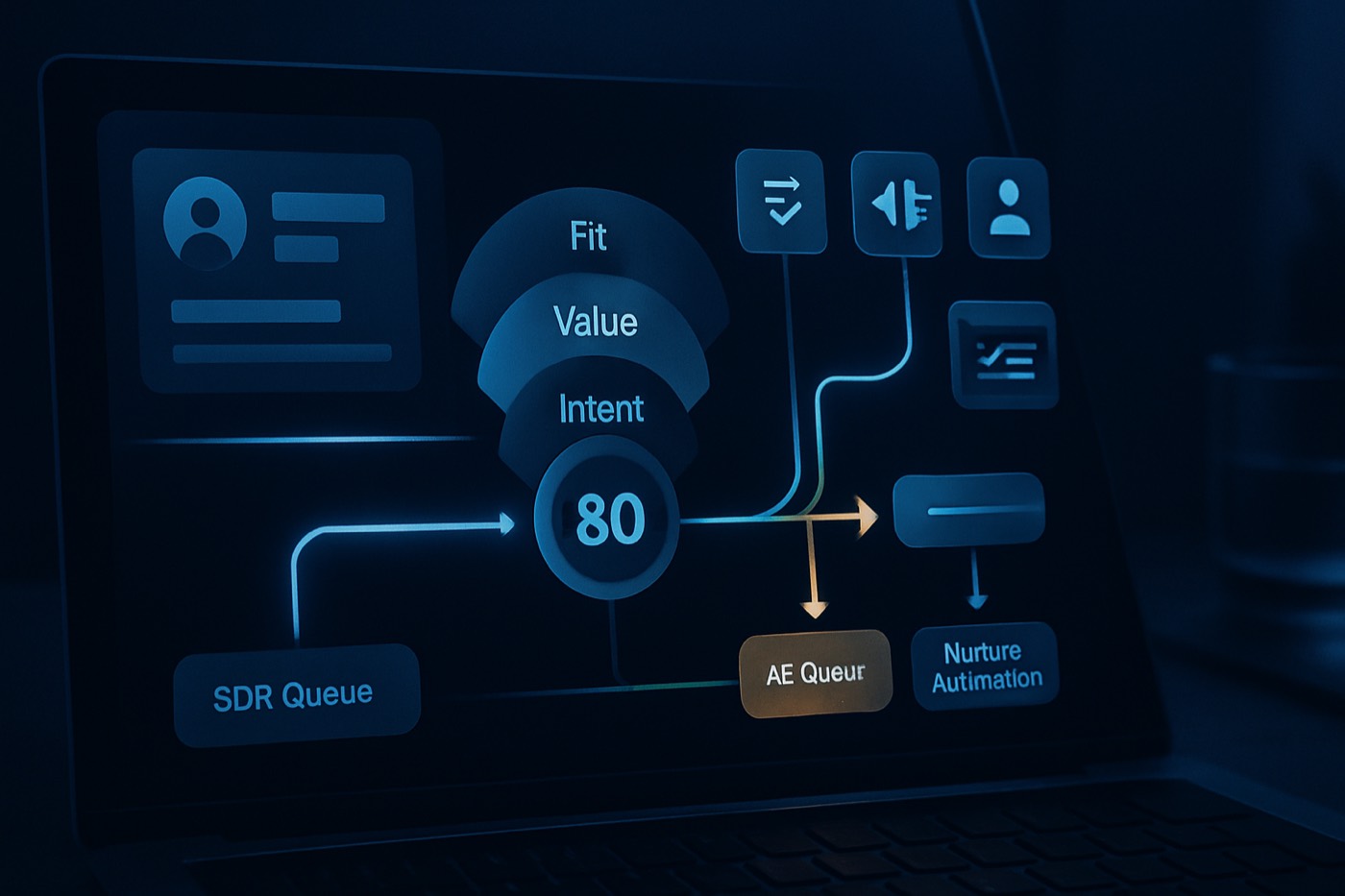
You already have the hardest input for scoring product-qualified leads: real product behavior. The mistake most teams make is treating usage data as nice-to-have analytics instead of a routing system that tells you who to contact, when, and why.
What PQL scoring actually means (and why most attempts stall)
PQL scoring is a system that turns product usage signals into three things:
- a numeric score,
- a qualification status (PQL, sales-ready PQL, or not ready), and
- an action (assign an owner, create tasks, start outreach).
A product-qualified lead (PQL) is commonly defined as a user or account that has experienced meaningful value in the product and is more likely to buy based on that usage, often coming from a free trial or freemium experience. (techtarget.com)
Where teams go wrong:
- They pick vanity events (logins) instead of value events.
- They mark PQL as a one-time label rather than a living score, so nothing ever decays.
- They route everything to sales, and sales stops trusting the signal.
- They score users but sell to accounts, so routing breaks.
The goal is a system that produces a daily answer to one question: which accounts deserve human time today, and what should the first touch say?
Chronic is an autonomous revenue operator, so it treats this as one continuous job rather than a static report. It scores the signals, decides which accounts are worth acting on, and drafts the outreach, surfacing the accounts and decisions that need a person to approve. The scoring model below is the same whether you run it by hand or hand it to an operator.
Step 1: define what a PQL is for PLG vs hybrid teams
Your definition has to match your go-to-market motion.
If you are PLG (self-serve first, sales assists later)
A PQL is an account that:
- hit an activation milestone (the moment value lands),
- repeats that value (frequency), and
- shows upgrade pressure (limits, seats, integrations, pricing intent).
OpenView describes PQLs as a way to surface accounts that have reached value and should go to sales based on in-product data. (openviewpartners.com)
If you are hybrid (marketing plus outbound plus PLG)
You need two labels:
- PQL = product engagement indicates value (good for nurture and a light SDR touch)
- Sales-ready PQL = value plus intent plus fit indicates a near-term conversation
This is the key operational shift: a PQL is not automatically a "call now."
Minimum viable PQL definition template (copy and paste)
Define PQL at the workspace (account) level.
A workspace is a PQL when:
- activation completed within the last 14 days, AND
- at least 2 key events completed, AND
- weekly active days >= 3 (or a product-specific frequency threshold)
A workspace is sales-ready when:
- fit score >= threshold (ICP match), AND
- an intent moment occurred (pricing, upgrade click, usage limit, integration setup), AND
- PQL score >= threshold (with decay applied)
Step 2: pick signals that correlate with conversion, not just activity
Use product analytics to find which behaviors correlate with retention or conversion, then turn those into scoring events. Amplitude recommends analyzing the in-product steps correlated with conversion and drop-off, not pageviews. (amplitude.com) Appcues frames activation around the moment value first lands and suggests analytics methods to find it. (appcues.com)
The 5 signal categories you want (with examples)
1. Activation signals (first value)
These should be binary and specific.
- "Connected data source"
- "Created first project"
- "Invited first teammate"
- "Published first report"
- "Completed onboarding checklist"
OpenView gives activation-style PQL triggers such as inviting a user and creating multiple issues (Jira-style milestones). (openviewpartners.com)
2. Key events (value moments)
Events that represent real outcomes, not clicks.
- "Ran automation successfully"
- "Sent first campaign"
- "Deployed integration"
- "Created 3 dashboards"
- "Processed 1,000 records"
3. Frequency and recency (habit)
- active days in the last 7 days
- sessions per week
- "3 of the last 7 days active" style rules
4. Expansion signals (multi-user and account growth)
- seats invited
- seats active
- role breadth (admin plus contributor)
- multiple teams or projects created
5. Intent moments (purchase pressure)
- pricing page viewed (in-app or web)
- upgrade modal opened
- plan limit reached (soft or hard)
- billing info added
- security or compliance page visited (enterprise)
- integration setup started (Salesforce, Slack, SSO)
Avoid these common bad signals
- logins alone
- time in app without a value-event context
- pageviews without segment context
- any event your own team triggers during onboarding
Step 3: build a scoring model with Fit plus Value plus Intent
A practical model is three subscores that roll up to a single PQL score:
- Fit score (0-100): is this account even in your ICP?
- Value score (0-100): did they experience meaningful outcomes?
- Intent score (0-100): are they signaling purchase pressure?
Then compute:
- PQL score (0-100) = 0.35 Fit + 0.45 Value + 0.20 Intent
Adjust the weights to your motion. High-ACV enterprise usually raises the Fit weight.
OpenView positions PQLs as a higher-converting source than traditional MQLs, which is exactly why you should protect sales capacity with Fit gating and tighter thresholds rather than firehosing reps. (openviewpartners.com)
Example scoring weights (a starter model you can build this week)
Fit (max 100)
- industry matches ICP: +25
- employee range matches ICP: +25
- region matches selling coverage: +10
- tech stack match (uses Salesforce, HubSpot, Snowflake): +20
- role match for the primary user (RevOps, Sales Ops, Growth): +20
Value (max 100)
- activation complete: +30
- key event A completed: +15
- key event B completed: +15
- weekly active days >= 3: +20
- 2 or more active users in the workspace: +20
Intent (max 100)
- pricing page view: +25
- upgrade click or plan compare: +35
- usage limit reached: +40
- integration setup started: +20
- security or SSO page view: +20
The gating rule that keeps sales from drowning
Before anything routes to sales, require:
- Fit >= 60 (or ICP = true), AND
- Value >= 50
Intent can boost priority, but do not let a lone pricing-page view create a false positive.
Step 4: add decay so yesterday's usage does not fake urgency
If a score only goes up, you eventually get score inflation where half the database looks hot.
Apply time-based decay:
- high-intent actions decay slower (pricing, limit hit)
- habit actions decay faster (daily usage)
A simple, implementable approach:
- each event has an initial score contribution.
- each day, multiply that contribution by a decay factor based on event type:
- habit events: 0.85 daily decay
- activation or key events: 0.93 daily decay
- intent moments: 0.96 daily decay
If you want a simpler ops-friendly rule, only count events inside a rolling window (last 7, 14, or 30 days) chosen per event.
Decay is a well-established practice in lead scoring, used to stop stale intent from dominating prioritization. (kb.mautic.org)
Step 5: set sales-ready thresholds (use two, not one)
You want:
- a PQL threshold that tells lifecycle and SDRs what to watch, and
- a sales-ready threshold that tells you when to spend rep time now.
Suggested thresholds (starter)
- PQL when PQL score >= 60
- Sales-ready PQL when:
- PQL score >= 75, AND
- Fit >= 70, AND
- Intent score >= 40 OR a "limit reached" event is present
Why this works:
- Fit keeps small, noisy accounts off rep calendars.
- Intent keeps happy free users from being pushed prematurely.
- the PQL threshold still lets lifecycle nurture keep them warm.
Add a fast lane for obvious hand-raisers
If any of these happen, override the thresholds:
- billing info added
- upgrade initiated
- hard usage limit hit
- SSO or SAML setup started (enterprise motion)
Step 6: build routing logic for SDR, AE, and lifecycle nurture
Routing is where a PQL program either creates pipeline or creates mistrust.
Routing matrix (practical and defensible)
Route to AE (direct)
Use when the account is both sales-ready and clearly in ICP.
- segment: mid-market or enterprise fit
- signals: limit hit, upgrade started, integration or SSO events
- ownership: assign an AE, create a follow-up task, open an opportunity if your process supports it
Route to SDR (qualification assist)
Use when usage is strong but qualification gaps exist.
- fit unknown or partial (missing firmographics)
- many users, unclear buying authority
- signals: activation plus key events plus moderate intent
- SDR goal: confirm ICP, map stakeholders, book the AE meeting
Route to lifecycle nurture (product and marketing)
Use when:
- fit is low, OR intent is weak, OR usage is early
- they are engaged but not under pressure
Nurture should be triggered by what they did:
- onboarding nudges
- use-case education
- upgrade education as they approach limits
SLA rules that protect conversion
- assign a sales-ready PQL within 5 minutes
- first touch within 1 business hour (faster for SMB)
Even perfect scoring fails if speed-to-lead is slow.
Step 7: the data model (workspace, user, usage rollups)
If you sell B2B, you are almost always selling to an account even when a single user starts the motion. Structure the data around workspace and account reality.
Recommended data model (minimum viable)
Core objects
- Account (company)
- Contact (people)
- Workspace (product account, tenant, org, team), linked to Account (several workspaces can map to one account in edge cases)
- Product user (optional, if you need per-user scoring), linked to Contact and Workspace
Usage rollup fields (on Workspace)
Fields you can refresh daily (or hourly):
activation_completed(boolean)activation_date(date)key_event_a_count_7d(number)key_event_b_count_7d(number)active_days_7d(number)active_users_7d(number)seats_invited_14d(number)pricing_views_14d(number)upgrade_clicks_14d(number)limit_hits_30d(number)pql_fit_score(0-100)pql_value_score(0-100)pql_intent_score(0-100)pql_score_total(0-100)pql_stage(enum: Not PQL, PQL, Sales-ready PQL)pql_last_signal_at(datetime)pql_routed_to(enum: AE, SDR, Nurture)pql_routed_at(datetime)pql_reason_codes(text or multi-select)
Reason codes (critical for trust)
Store the top 3 reasons as plain text:
reason_1 = "Limit hit: 3 times in 7d"reason_2 = "Invited 5 seats"reason_3 = "Viewed pricing twice"
Adoption goes up when whoever takes the account can see "why now" at a glance.
Where Chronic fits (scoring plus action, with approvals)
Chronic is built for the second half of this: turning the score into action without you babysitting the handoff. When a workspace crosses the sales-ready threshold, the agent reads the same fit and behavior signals, enriches the account, picks a playbook from the reason codes, and drafts a behavior-referenced email, then holds the outreach for your approval before anything sends. You set the ICP, the offer, and how much it can do on its own; it runs discovery, enrichment, scoring, and outreach against your revenue goal and surfaces only the decisions that matter.
Step 8: QA your scoring (false positives, internal accounts, sampling)
QA is not optional. Without it, sales will write off the whole program as fluffy.
QA checklist (run this before you turn on routing)
1. Exclude internal and test accounts
Build hard filters:
- email domains: your own company, contractors, QA vendors
- workspace name patterns: "test", "demo", "sandbox"
- known QA user IDs
- IP ranges, if relevant
2. Catch implementation-partner and competitor noise
If agencies or consultants sign up to evaluate, you may want to:
- route to SDR with a different play, or
- tag as "Partner" and handle separately
3. Sample 50 recent sales-ready PQLs and audit by hand
For each:
- do we agree this is a real account?
- did they reach real value?
- is there buying pressure?
- is the segment correct?
- would a rep be glad they got this?
Track false positives by category. That list becomes your iteration backlog.
4. Backtest against outcomes (minimum viable)
Look at the last 60 to 90 days:
- what score did customers have 7 days before they converted?
- what events were common among converters?
- which events are common among churners and tire-kickers?
Product analytics tools are built to surface the steps correlated with conversion and retention. (amplitude.com)
5. Add a sales-disposition loop
Add fields:
pql_disposition(Accepted, Rejected, Recycled)pql_rejection_reason(Not ICP, No intent, Student, Consultant, Already using a competitor)
Review these weekly with RevOps and Product. This is how you keep the model honest.
Step 9: the 2-week build plan
Day 1-2: define activation and key events
- choose 1 activation milestone.
- choose 3 to 5 key events (value outcomes).
- define rolling windows (7d, 14d, 30d).
Day 3-5: build your rollups
- add event tracking if needed.
- create workspace rollup jobs (a daily batch is fine to start).
- write the values into your fields.
Day 6-7: implement scoring plus decay
- compute the Fit, Value, and Intent subscores.
- apply decay or rolling windows.
- populate
pql_score_totalandpql_stage.
Week 2: routing, QA, and a pilot
- turn on routing for one segment first (SMB or mid-market).
- add reason codes.
- run the 50-account audit.
- hold a weekly PQL calibration meeting.
Step 10: turn the score into action (enrichment plus outreach)
This is where a PQL stops being a report and becomes pipeline.
When a workspace becomes a sales-ready PQL, run an automated chain:
Enrich the account
- company size, industry, funding, tech stack
- key contacts (RevOps, Sales Ops, Growth)
Pick the right playbook from the reason codes
- limit hit, run a usage-pressure upgrade play
- seats invited, run a team-expansion play
- integration started, run an implementation-assist play
Draft a behavior-referenced email using:
- the top 3 reason codes
- the prospect's role
- the use case inferred from the events
- the segment and the CTA you want
Create tasks and enroll outreach behind approval gates
- the SDR gets tasks for qualification gaps
- the AE gets a direct meeting CTA for high-fit accounts
- everyone else goes to lifecycle nurture
When you let an agent execute these steps, keep a person on the decisions that carry brand risk. The approval patterns for that are covered in Human-in-the-loop AI SDR: the 4 approval patterns that prevent brand damage (and still save time).
Outreach examples (behavior-based, not creepy)
SDR opener for "activation plus invites"
- "Saw your team started collaborating in [product] and invited a few teammates. Most teams at this stage run into [common next step]. Want a 12-minute walkthrough so you hit [value milestone] faster?"
AE opener for "limit hit plus pricing intent"
- "Noticed you hit [limit] a couple of times this week and checked pricing. Tell me your target workflow and team size and I can point you to the smallest plan that removes the friction and keeps usage stable."
Tooling and integration notes (so this works in the real world)
Data sources you typically need
- product events (Segment, RudderStack, Snowplow, or direct)
- product analytics (Amplitude, Mixpanel, PostHog)
- a system of record where scoring and routing live
Best practice: score on the account, explain on the contact
- store the score and stage on the workspace or account
- store the primary user and top champion on the contact
- when you route, create a task for the owner that carries the score, the reason codes, and a suggested talk track
Common approaches (and trade-offs)
If you are deciding where the scoring and action live, the real trade-offs look like this:
- HubSpot or Salesforce: flexible systems of record, but PLG event modeling usually needs more ops and engineering work to keep clean.
- Apollo: strong for outbound data and sequencing, but you still have to stitch in the product signals yourself.
- Attio: great flexible objects, but you still need a disciplined event schema.
If you are comparing tools, these may help:
- Chronic vs HubSpot
- Chronic vs Salesforce
- Chronic vs Apollo
- Chronic vs Attio
FAQ
What is the difference between a PQL and an SQL?
A PQL is qualified by product usage: they experienced value in the product. An SQL is qualified by sales discovery: budget, authority, need, timeline, and agreement on a next step. PQLs are usually earlier, and they become SQLs after a sales conversation meets your acceptance criteria. (techtarget.com)
What are the best product usage signals for PQL scoring?
The highest-signal categories are activation completion, key value events, frequency and recency, seat expansion, and intent moments like pricing views, upgrade clicks, integration starts, and usage-limit hits. OpenView highlights activation-style milestones as a way to surface PQLs. (openviewpartners.com)
Should I score PQLs at the user level or the account level?
For B2B, score at the account or workspace level, because deals close at the account level. Keep user-level context for "who did what" (champion identification), but route and prioritize on workspace rollups.
How do I choose the right PQL threshold?
Backtest. Find the score range that best predicts conversion or sales acceptance inside your typical sales-cycle window. Start with two thresholds (PQL and sales-ready) and adjust every 2 to 4 weeks based on false positives and missed wins.
How do I stop sales from getting flooded with low-quality PQLs?
Use Fit gating (ICP match), require value milestones (activation plus key events), apply score decay, and route mid-signal accounts to SDR or nurture instead of AEs. Store reason codes so reps can see exactly why an account routed to them.
What should happen automatically when an account becomes sales-ready?
At minimum: enrich the account, assign the right owner, create a task with reason codes, and draft a personalized first touch. This is where an autonomous operator earns its keep, turning the signal into a meeting request while a person approves the outreach that carries brand risk.
Build the first working version in 14 days
If you want this live fast without a brittle mess, follow this order:
- define activation plus 3 to 5 key events (value outcomes).
- build workspace rollups (7d, 14d, 30d) and push them into your scoring fields.
- implement Fit, Value, and Intent scoring with decay or rolling windows.
- set two thresholds (PQL vs sales-ready) and a fast lane for hand-raisers.
- turn on routing for one segment, audit 50 routed accounts, iterate.
- add the action layer: enrichment, behavior-based drafts, and approval gates.
To turn ICP and enrichment into a repeatable workflow, pair this with Previewable ICP matching: how to validate lookalike accounts before you spend credits, and for routing and stack design, Outbound stack blueprint for 2026: CRM as system of record, outreach as system of action (and what to sync).