AI features vs. an AI operator: 9 criteria for spotting software that can actually run outbound
"AI features" suggest, summarize, and draft, then leave the work to you. An AI operator takes governed action on its own: finds prospects, sends from warmed mailboxes, handles replies, books meetings, and surfaces approvals only where the stakes are real.
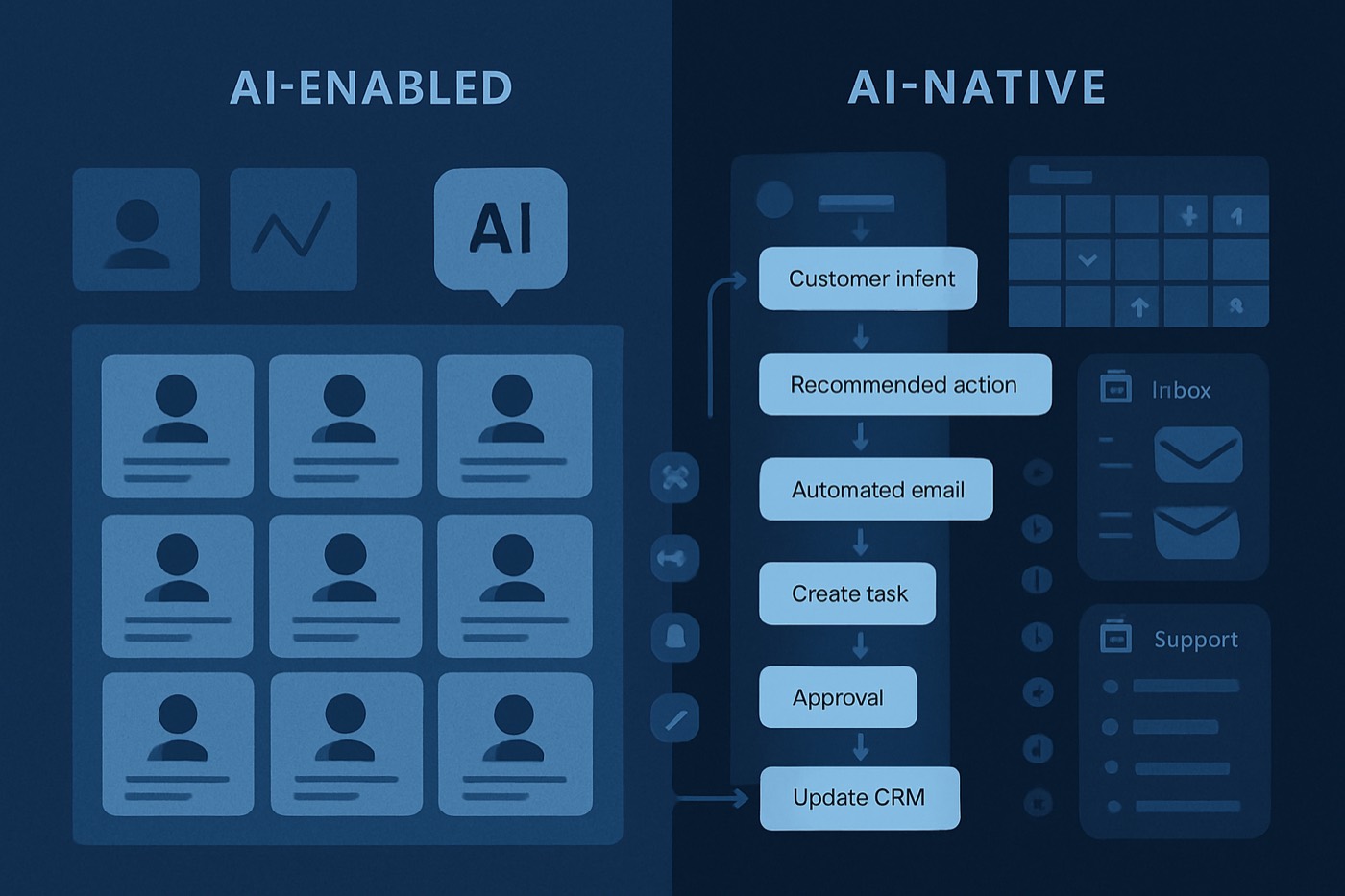
AI is now table stakes in sales tooling. Almost every product has "AI" on the box. But there is a wide gap between software that suggests and software that acts, and most buyers only discover which one they bought after the trial ends.
The split is simple once you name it:
- AI features are bolted on top of your existing stack. They draft emails, summarize calls, score leads, and surface "insights." Useful, but the work still lands back on a human to send, route, follow up, and update.
- An AI operator is built to take action on your behalf, inside guardrails. It finds prospects, writes and sends outreach, handles the replies, books the meeting, keeps records current, and learns from what worked, asking for a human only on the decisions that matter.
This post is a buyer rubric, not a product pitch. The 9 criteria below let you tell the two apart in a demo, no matter what category a vendor files itself under.
Why this distinction matters now
Sales orgs are moving past drafting and summarization toward systems that execute work across the cycle. Salesforce's State of Sales 2026 announcement describes how mainstream AI and agents have become, including reported expectations around less time spent on research and drafting. (salesforce.com)
At the same time, the bar for governance is rising. Risk frameworks and regulations increasingly expect meaningful human oversight over consequential automated decisions. GDPR Article 22, for example, describes a right relating to decisions based solely on automated processing, and calls out safeguards such as the ability to obtain human intervention. (gdpr-info.eu)
The NIST AI Risk Management Framework frames risk management as continuous and operational across a system's lifecycle, not a one-time model choice. (nist.gov, nist.gov)
So the buyer question is no longer "does it have AI?" It is:
- Can it take action safely, without a human babysitting each step?
- Can it prove what it did afterward?
- Does it get better from outcomes, or repeat the same mistakes?
McKinsey has estimated meaningful productivity gains from generative AI across functions, including sales, but capturing that value requires redesigning the process and operationalizing the AI, not just handing reps a model. (mckinsey.com) A drafting feature does not redesign anything. An operator does.
The 9-criteria buyer rubric
For each criterion you get a short definition, what "real" looks like, what a thin AI feature looks like instead, and how it shows up in the actual jobs of outbound: finding prospects, enrichment, writing and sending, reply handling, and keeping pipeline honest.
1) A trusted data layer (not a side panel)
Definition
The system works off one consistent, queryable model of accounts, people, activities, emails, signals, and outcomes, rather than reaching across a tangle of disconnected tools.
What "real" looks like
- One canonical record per account, contact, and lead.
- Activities and events reliably attached to the right entity.
- The AI reads and writes against the same truth a human sees, not a separate copy.
What a thin AI feature looks like
- Data spread across integrations and disconnected objects.
- AI lives in a side panel and cannot reliably update the records that matter.
Where it shows up
- Finding prospects: targeting uses full firmographic and activity context, not just whatever was on a form.
- Enrichment: updates land on the right record instead of spawning duplicates.
- Writing: personalization pulls from trusted fields, not guesses.
- Reply handling: a reply maps to the correct contact and opportunity.
2) Identity resolution (dedupe that actually works)
Definition
Linking records that represent the same real-world entity across identifiers such as emails, domains, names, and job history. In customer data platforms this is usually described as deterministic and probabilistic matching. (en.wikipedia.org)
What "real" looks like
- Deterministic rules (domain plus company name, email plus contact).
- Probabilistic or hybrid matching for the edge cases.
- Transparent merge logic, reversible merges, and conflict resolution.
What a thin AI feature looks like
- Dedupe by email only.
- Silent overwrites, or "suggested merges" that are painful to validate.
Where it shows up
- Scoring: signal is not diluted across duplicates.
- Enrichment: enrichment attaches to the right record instead of building Franken-records.
- Reply handling: an inbound reply does not create a second contact.
3) Enrichment and verification (fresh data with confidence)
Definition
Enrichment adds firmographic, technographic, and contact data. Verification checks whether that data is accurate and current, ideally with a confidence score and a refresh cadence.
What "real" looks like
- Enrichment runs as a workflow with rules: when to refresh, when to lock fields, when to require approval.
- Verification signals attached: source, timestamp, confidence, change history.
What a thin AI feature looks like
- One-time enrichment at capture, then never again.
- No verification, no confidence, no refresh policy.
Where it shows up
- Writing: fewer embarrassing errors (wrong role, wrong company size).
- Targeting: accurate segmentation and territory routing.
- Deliverability: stale or invalid addresses get caught before they bounce and damage sender reputation.
Deeper read: Lead enrichment workflow: how to keep your data accurate in 2026 (rules, refresh cadence, and confidence scores)
4) Signal ingestion (the system should hear the market)
Definition
The system can take in events and react to them: website and intent activity, funding, hiring, tech changes, opens and replies (handled carefully for privacy and deliverability), product usage, and meeting outcomes.
What "real" looks like
- A pipeline for events: normalize, dedupe, attach to identities, score, trigger the next step.
- Near-real-time handling with backfills and retries.
What a thin AI feature looks like
- Signals live in separate tools with weak links back to accounts and contacts, so nobody acts on them in time.
Where it shows up
- Prioritization: speed-to-signal becomes possible, where a fresh trigger jumps the queue.
- Outreach: prospects get enrolled or paused as signals cross a threshold.
- Reply handling: a positive reply routes for a human in minutes, not days.
Related playbook: Signal-based outbound in 2026: how to build a 'speed-to-signal' workflow
5) A permissions model (the agent has a role, not god-mode)
Definition
An operator that can act needs explicit limits on what it is allowed to do: which records it can read, which fields it can write, and which actions require a human first.
What "real" looks like
- The agent runs with least-privilege access, like a scoped service account.
- Permissions scoped by team, territory, stage, or data sensitivity.
- Field-level limits, for example: the agent can draft but not auto-send, can suggest a stage change but not mark a deal won.
What a thin AI feature looks like
- The AI operates outside the real permission model, or you cannot scope it cleanly at all.
Where it shows up
- Writing: the agent drafts in the right tone and template but cannot send outside policy.
- Records: the agent proposes updates without overwriting custom logic.
- Safety: there is no path for the agent to touch fields it was never trusted with.
6) Audit logs (you cannot govern what you cannot reconstruct)
Definition
Immutable records of who did what, when, and why, covering human actions, agent actions, automations, data changes, and the model outputs used in a decision.
What "real" looks like
- Field-level change logs.
- Action provenance: "this lead was routed because of signal Y, drafted from evidence X, approved by Z."
- Exportable logs for security and compliance.
What a thin AI feature looks like
- "AI did something" with no trace, or logs scattered across half a dozen tools.
Where it shows up
- Reply handling: you can debug a missed response or a bad routing decision.
- Scoring: you can explain why a lead was prioritized, then correct it.
- Records: you can roll back a bad bulk update safely.
7) Human-in-the-loop approvals (oversight, not theater)
Definition
High-downside actions require a human review first: sending email, changing an opportunity's amount or stage, creating tasks for executives, writing to sensitive fields.
This matches the broad governance direction that meaningful human intervention should exist for consequential automated decisions. (gdpr-info.eu)
What "real" looks like
- Approval queues with context: what the agent wants to do, the evidence behind it, the expected impact.
- Bulk approvals (approve 50 enrichments, reject 10) so review does not become the new bottleneck.
- SLAs and routing so approvals do not rot in a queue.
What a thin AI feature looks like
- A binary choice: trust the AI completely, or do everything by hand.
Where it shows up
- Writing: a human approves drafts quickly, and the system learns the preferences.
- Enrichment: ops signs off on high-risk field changes.
- Pipeline: a manager approves a stage jump or close date the agent suggested.
8) Sandboxing and dry-runs (scoped, reversible action)
Definition
The agent can run in a controlled way: limited to specific tools and actions, testable before it touches production, and stoppable mid-flight.
What "real" looks like
- Dry-run mode that shows intended changes without applying them.
- Hard policy constraints: never email an unsubscribed contact, never touch a closed-won deal.
- Rate limits and anomaly detection on bulk actions, plus a visible kill switch.
What a thin AI feature looks like
- No real action layer, or unsafe automation that can spam contacts or corrupt data with no way to stop it.
Where it shows up
- Outreach: the agent enrolls prospects only once compliance checks pass.
- Reply handling: safe auto-tagging and triage before anything is sent back.
- Records: a preview of proposed changes before any mass update.
9) Orchestration and learning (the line that actually moves outcomes)
This is the real divide. Everything above is necessary; this is what separates a tool that helps from an operator that runs the work.
9a) Action orchestration
The ability to coordinate multi-step work, not just fire one action: enroll in a sequence, route to an owner, create tasks, update fields, pause outreach on a reply, move a deal across stages, hand off from SDR to AE to CS.
What "real" looks like
- A workflow engine where the agent executes steps under constraints and approvals.
- Idempotent actions (no accidental duplicates) and retries on failure.
- A clear mapping from signals to the actions they trigger.
9b) Continuous learning
Outcomes flow back into the system: which emails got replies, which sequences booked meetings, which prospects became pipeline, which deals closed, and which actions caused harm such as spam complaints or unsubscribes.
What "real" looks like
- Scoring is recalibrated from real outcomes, not set once a quarter.
- Workflow rules adjust on performance: sequence variants, channel mix, routing thresholds.
- Holdouts and simple A/B tests are supported, so improvement is measured, not assumed.
What a thin AI feature looks like
- Output never measurably improves, because the system never captures outcomes in a structured way.
Where it shows up
- Scoring: priorities shift as the market shifts, not on a quarterly cadence.
- Writing: messaging improves from reply patterns, not vibes.
- Reply handling: triage sharpens as the system learns what real intent looks like for your offer.
- Forecasting: numbers improve because records stay current through governed action plus feedback.
How the 9 criteria show up across outbound
A quick map to use during evaluation.
Finding and scoring prospects
Real operator behavior: builds the target list from a trusted data layer plus live signals plus verified enrichment, gives an explainable reason and a recommended action, routes and enrolls with approvals where needed, and learns from outcomes such as meetings held and pipeline created. If the "AI" stops at a number in a dashboard, it is a feature, not an operator.
Related: Why AI lead scoring fails (and how enrichment fixes it)
Enrichment
Real operator behavior: identity resolution prevents duplicates, verification and confidence scores gate updates, audit logs show what changed and why, and approvals guard sensitive fields. The thin version says "we enrich leads" but you cannot trust freshness, source, or merges.
Writing and sending
Real operator behavior: drafts are grounded in verified fields and recent signals, sends are governed by permissions and approvals, sequences pause on replies, bounces, or risk signals, and outcome feedback improves future messaging. The thin version produces nice drafts with no control plane for deliverability, policy, or reply-driven orchestration. The difference is whether anyone has to babysit the send.
Related: The right system of record for cold email in 2026: 9 options that won't kill your deliverability
Reply handling and routing
Real operator behavior: accurate identity linking so there is no "who replied?" confusion, triage into intent categories with confidence, automatic routing and task creation, human review for edge cases, and full auditability. The thin version sends notifications and labels, then leaves the routing and data updates to a human.
Pipeline hygiene and forecasting
Real operator behavior: the agent proposes updates with evidence (last contact, mutual plan, next meeting), field-level governance and logs, automated updates for low-risk fields like next step and activity logging, and continuous improvement from win-loss outcomes. The thin version produces summaries and reminders with no governed execution loop behind them.
Questions to ask in a demo (copy/paste)
These force a vendor to be specific. A product that can actually act will answer with screens and logs, not adjectives.
- Data layer. "Where does the agent read from and write to? Is it the records my team uses, or a separate AI copy?"
- Identity resolution. "Show me how you dedupe accounts and contacts. What identifiers do you match on? Can you reverse a merge?"
- Enrichment and verification. "How do you verify enriched fields, track freshness, and avoid overwriting trusted data? Do you support confidence scores and refresh rules?"
- Signals. "Show me how a signal arrives, attaches to an identity, and triggers an action. What happens when signals arrive out of order?"
- Permissions. "Does the agent run with least-privilege access? Can we restrict write access to specific fields and pipelines?"
- Audit logs. "Open the log for an AI-driven change. Can I see the evidence used, the action taken, and who approved it?"
- Approvals. "Which actions run unattended, and which require a human? Show me the approval queue and how it routes."
- Sandboxing. "Can I run the agent in dry-run mode and see intended changes before they apply? How do you rate-limit or stop a runaway action?"
- Orchestration and learning. "After the agent acts, how do outcomes feed back into scoring and rules? Show me how a closed-won deal changes future prioritization."
A scoring rubric so you can compare fast
Score each criterion 0 to 2:
- 0 = not present, or vague.
- 1 = present but shallow (manual, brittle, not auditable).
- 2 = operationalized (governed, auditable, outcome-driven).
Interpretation
- 0 to 7: AI features layered on your stack. Helpful, but the work still lands on you.
- 8 to 13: transitional, with some real action capability.
- 14 to 18: a system that can genuinely run the work.
One shortcut: if a vendor cannot show audit logs, permissions, and approvals for AI actions, treat any "agentic" claim as marketing.
Where Chronic fits
Chronic is an autonomous revenue operator, not a CRM and not an AI feature you bolt onto one. You give it a revenue goal, a budget, your offer, and the approval level you are comfortable with, and it runs the outbound system end to end: it finds and enriches prospects, scores them on real signals, writes and sends cold email from managed, warmed mailboxes, handles the replies, and books meetings, while protecting your domains, mailboxes, and sender reputation.
It is built against the same three things this rubric measures:
- Work from a trusted, current view of accounts and contacts.
- Take governed action, with permissions, audit logs, approvals, and a kill switch, so handing over control never means losing it.
- Learn from outcomes (replies, meetings held, pipeline, wins) so the next week of outbound is better than the last.
Chronic optimizes for one outcome, qualified meetings held with relevant prospects, and is built against vanity metrics like emails sent and open rates. It surfaces approvals only for the decisions that carry real downside and stays quiet otherwise.
More context on agentic workflows: Salesforce State of Sales 2026: the 5 sales workflows to automate first with AI agents (and the 5 to keep human)
FAQ
What is the difference between AI features and an AI operator?
AI features add chat, drafting, summaries, and scoring on top of your existing tools, then leave the work to a human. An AI operator takes governed action on its own: it finds prospects, sends outreach, handles replies, books meetings, keeps records current, and learns from outcomes, asking for a human only on consequential decisions.
Does "operator" mean it trains its own models?
Not necessarily. It is about system design, not model ownership: a trusted data layer, permissions, audit logs, approvals, sandboxing, and feedback loops. Many capable systems use third-party models but operationalize them responsibly, in line with frameworks like NIST AI RMF. (nist.gov)
Why are audit logs a deciding factor for AI that takes action?
Because those actions touch customers, deliverability, and revenue. Without audit logs you cannot reconstruct what happened, debug a failure, or prove governance. If a vendor cannot show field-level change history and action provenance, it is not a serious system of action.
How do human-in-the-loop approvals relate to compliance?
Meaningful human oversight is a common safeguard expectation in automated decision-making. GDPR Article 22, for example, discusses safeguards including the right to obtain human intervention in certain cases of solely automated processing. Even outside GDPR's scope, approvals reduce operational and reputational risk. (gdpr-info.eu)
Can a CRM with add-ons act like an operator?
It can approximate parts of the behavior with heavy configuration and extra tooling. The question is whether you can get the whole loop, trusted data, identity resolution, governed permissions, audit logs, approvals, sandboxing, orchestration, and outcome learning, inside one workflow rather than scattered across plugins that a human still has to stitch together.
Which workflows should I evaluate first?
Start where action and feedback are obvious:
- Prospect scoring and routing.
- Enrichment refresh and verification.
- Sequencing with reply handling and auto-pause.
- Pipeline updates with approvals.
These quickly reveal whether the product is built to execute or only to report.
Use the rubric to choose software that can actually act
Bring these 9 criteria into every demo, score each vendor 0 to 2, and insist on seeing the operational screens: logs, approvals, permissions, dry-runs, and outcome reporting. If a product cannot show governed action end to end across finding prospects, enrichment, sending, reply handling, and pipeline updates, you are looking at AI features, not an operator that can carry the work for you.